Compare commits
36 Commits
| Author | SHA1 | Date | |
|---|---|---|---|
 yadong.zhang yadong.zhang
|
8b3bc42678 | ||
|
yadong.zhang
|
164e12de1f | ||
|
yadong.zhang
|
369388c11d | ||
|
yadong.zhang
|
a1200b2510 | ||
|
yadong.zhang
|
6ea1d41211 | ||
|
yadong.zhang
|
ddde4ef1f5 | ||
|
yadong.zhang
|
26884f7218 | ||
|
yadong.zhang
|
7f9c12d5bf | ||
|
yadong.zhang
|
fbeb4c68ab | ||
|
yadong.zhang
|
179287f720 | ||
|
yadong.zhang
|
8a47735208 | ||
|
yadong.zhang
|
0feb859f68 | ||
|
yadong.zhang
|
441dda3970 | ||
|
yadong.zhang
|
b564ce8a89 | ||
|
yadong.zhang
|
5e0065508a | ||
|
yadong.zhang
|
cf6f42b586 | ||
|
yadong.zhang
|
89b5fe4543 | ||
|
yadong.zhang
|
6f313fa91a | ||
|
yadong.zhang
|
36bcebdd46 | ||
|
yadong.zhang
|
99b8680fd2 | ||
|
yadong.zhang
|
2717d9cf7a | ||
|
yadong.zhang
|
166ddffaf4 | ||
|
yadong.zhang
|
33385fd30a | ||
|
yadong.zhang
|
8e5a679129 | ||
|
yadong.zhang
|
5ab2e87157 | ||
|
yadong.zhang
|
c34e226a54 | ||
|
yadong.zhang
|
e4985c63f3 | ||
|
yadong.zhang
|
e93ad07c5f | ||
|
yadong.zhang
|
4ca1f46722 | ||
|
yadong.zhang
|
571c3438e4 | ||
|
yadong.zhang
|
2497519ec1 | ||
|
yadong.zhang
|
278a435cdb | ||
|
harrylee
|
e75df92080 | ||
|
崔子健
|
9e6a4c61b0 | ||
|
Spet
|
d355699cc3 | ||
|
yadong.zhang
|
28466f8ab5 |
@@ -1,12 +1,12 @@
|
||||
<p align="center">
|
||||
<a href="https://docs.justauth.whnb.wang"><img src="https://gitee.com/yadong.zhang/static/raw/master/JustAuth/Justauth.png" width="400"></a>
|
||||
<a href="https://justauth.wiki"><img src="https://gitee.com/yadong.zhang/static/raw/master/JustAuth/Justauth.png" width="400"></a>
|
||||
</p>
|
||||
<p align="center">
|
||||
<strong>Login, so easy.</strong>
|
||||
</p>
|
||||
<p align="center">
|
||||
<a target="_blank" href="https://search.maven.org/search?q=JustAuth">
|
||||
<img src="https://img.shields.io/badge/Maven%20Central--1.15.3-alpha-blue" ></img>
|
||||
<img src="https://img.shields.io/badge/Maven%20Central--1.15.6-blue" ></img>
|
||||
</a>
|
||||
<a target="_blank" href="https://gitee.com/yadong.zhang/JustAuth/blob/master/LICENSE">
|
||||
<img src="https://img.shields.io/apm/l/vim-mode.svg?color=yellow" ></img>
|
||||
@@ -15,9 +15,9 @@
|
||||
<img src="https://img.shields.io/badge/JDK-1.8+-green.svg" ></img>
|
||||
</a>
|
||||
<a target="_blank" href="https://apidoc.gitee.com/yadong.zhang/JustAuth/" title="API文档">
|
||||
<img src="https://img.shields.io/badge/Api%20Docs--1.15.3-alpha-latest-orange" ></img>
|
||||
<img src="https://img.shields.io/badge/Api%20Docs--1.15.6-latest-orange" ></img>
|
||||
</a>
|
||||
<a target="_blank" href="https://docs.justauth.whnb.wang" title="参考文档">
|
||||
<a target="_blank" href="https://justauth.wiki" title="参考文档">
|
||||
<img src="https://img.shields.io/badge/Docs-latest-blueviolet.svg" ></img>
|
||||
</a>
|
||||
<a href="https://codecov.io/gh/zhangyd-c/JustAuth">
|
||||
@@ -71,7 +71,7 @@
|
||||
<td align="center" width="200"><img src="https://gitee.com/yadong.zhang/static/raw/master/JustAuth/twitter.png" width="20"></td>
|
||||
</tr>
|
||||
</table>
|
||||
<center><a href="https://docs.justauth.whnb.wang/#/?id=%E5%B7%B2%E9%9B%86%E6%88%90%E7%9A%84%E5%B9%B3%E5%8F%B0" target="_blank">查看更多</a></center>
|
||||
<center><a href="https://justauth.wiki/#/?id=%E5%B7%B2%E9%9B%86%E6%88%90%E7%9A%84%E5%B9%B3%E5%8F%B0" target="_blank">查看更多</a></center>
|
||||
</center>
|
||||
|
||||
-------------------------------------------------------------------------------
|
||||
@@ -81,7 +81,7 @@
|
||||
`JustAuth`, as you see, It is just a Java library of third-party authorized login, It's smaller and easier to use. JustAuth is the best third-party login tool written in JAVA.
|
||||
|
||||
Source Code:[gitee](https://gitee.com/yadong.zhang/JustAuth) | [github](https://github.com/zhangyd-c/JustAuth)
|
||||
Docs:[Reference Doc](https://docs.justauth.whnb.wang)
|
||||
Docs:[Reference Doc](https://justauth.wiki)
|
||||
|
||||
## Features
|
||||
|
||||
@@ -97,7 +97,7 @@ These artifacts are available from Maven Central:
|
||||
<dependency>
|
||||
<groupId>me.zhyd.oauth</groupId>
|
||||
<artifactId>JustAuth</artifactId>
|
||||
<version>1.15.3-alpha</version>
|
||||
<version>1.15.6</version>
|
||||
</dependency>
|
||||
```
|
||||
- Using JustAuth
|
||||
@@ -148,57 +148,6 @@ Note, that since [v1.14.0](https://gitee.com/yadong.zhang/JustAuth/releases/v1.1
|
||||
</dependency>
|
||||
```
|
||||
|
||||
|
||||
**Examples**:
|
||||
- [Springboot Example](https://github.com/justauth/JustAuth-demo)
|
||||
- [jFinal Example](https://github.com/xkcoding/jfinal-justauth-demo): by [xkcoding](https://github.com/xkcoding)
|
||||
- [ActFramework Example](https://github.com/xkcoding/act-justauth-demo): by [xkcoding](https://github.com/xkcoding)
|
||||
- [Nutzboot Example](https://github.com/EggsBlue/nutzboot-justauth-demo): by [蛋蛋](https://github.com/EggsBlue)
|
||||
- [Blade Example](https://github.com/justauth/blade-justauth-demo)
|
||||
|
||||
**Springboot Starter**
|
||||
|
||||
- [justauth-spring-boot-starter](https://github.com/xkcoding/justauth-spring-boot-starter): Spring Boot integrates best practices with JustAuth by [xkcoding](https://github.com/xkcoding)
|
||||
- [justauth-spring-boot-starter-demo](https://github.com/justauth/justauth-spring-boot-starter-demo): Justauth-spring-boot-starter demo project by [xkcoding](https://github.com/xkcoding)
|
||||
|
||||
#### API
|
||||
| :computer: platform | :coffee: API | :page_facing_up: Official document |
|
||||
|:------:|:-------:|:-------:|
|
||||
| <img src="https://gitee.com/yadong.zhang/static/raw/master/JustAuth/gitee.png" width="20"> | [AuthGiteeRequest](https://gitee.com/yadong.zhang/JustAuth/blob/master/src/main/java/me/zhyd/oauth/request/AuthGiteeRequest.java) | <a href="https://gitee.com/api/v5/oauth_doc#list_1" target="_blank">参考文档</a> |
|
||||
| <img src="https://gitee.com/yadong.zhang/static/raw/master/JustAuth/github.png" width="20"> | [AuthGithubRequest](https://gitee.com/yadong.zhang/JustAuth/blob/master/src/main/java/me/zhyd/oauth/request/AuthGithubRequest.java) | <a href="https://developer.github.com/apps/building-oauth-apps/authorizing-oauth-apps/" target="_blank">参考文档</a> |
|
||||
| <img src="https://gitee.com/yadong.zhang/static/raw/master/JustAuth/weibo.png" width="20"> | [AuthWeiboRequest](https://gitee.com/yadong.zhang/JustAuth/blob/master/src/main/java/me/zhyd/oauth/request/AuthWeiboRequest.java) | <a href="https://open.weibo.com/wiki/%E6%8E%88%E6%9D%83%E6%9C%BA%E5%88%B6%E8%AF%B4%E6%98%8E" target="_blank">参考文档</a> |
|
||||
| <img src="https://gitee.com/yadong.zhang/static/raw/master/JustAuth/dingtalk.png" width="20"> | [AuthDingTalkRequest](https://gitee.com/yadong.zhang/JustAuth/blob/master/src/main/java/me/zhyd/oauth/request/AuthDingTalkRequest.java) | <a href="https://open-doc.dingtalk.com/microapp/serverapi2/kymkv6" target="_blank">参考文档</a> |
|
||||
| <img src="https://gitee.com/yadong.zhang/static/raw/master/JustAuth/baidu.png" width="20"> | [AuthBaiduRequest](https://gitee.com/yadong.zhang/JustAuth/blob/master/src/main/java/me/zhyd/oauth/request/AuthBaiduRequest.java) | <a href="http://developer.baidu.com/wiki/index.php?title=docs/oauth" target="_blank">参考文档</a> |
|
||||
| <img src="https://gitee.com/yadong.zhang/static/raw/master/JustAuth/coding.png" width="25"> | [AuthCodingRequest](https://gitee.com/yadong.zhang/JustAuth/blob/master/src/main/java/me/zhyd/oauth/request/AuthCodingRequest.java) | <a href="https://open.coding.net/references/oauth/" target="_blank">参考文档</a> |
|
||||
| <img src="https://gitee.com/yadong.zhang/static/raw/master/JustAuth/tencentCloud.png" width="25"> | [AuthTencentCloudRequest](https://gitee.com/yadong.zhang/JustAuth/blob/master/src/main/java/me/zhyd/oauth/request/AuthTencentCloudRequest.java) | <a href="https://dev.tencent.com/help/doc/faq/b4e5b7aee786/oauth" target="_blank">参考文档</a> |
|
||||
| <img src="https://gitee.com/yadong.zhang/static/raw/master/JustAuth/oschina.png" width="20"> | [AuthOschinaRequest](https://gitee.com/yadong.zhang/JustAuth/blob/master/src/main/java/me/zhyd/oauth/request/AuthOschinaRequest.java) | <a href="https://www.oschina.net/openapi/docs/oauth2_authorize" target="_blank">参考文档</a> |
|
||||
| <img src="https://gitee.com/yadong.zhang/static/raw/master/JustAuth/alipay.png" width="20"> | [AuthAlipayRequest](https://gitee.com/yadong.zhang/JustAuth/blob/master/src/main/java/me/zhyd/oauth/request/AuthAlipayRequest.java) | <a href="https://alipay.open.taobao.com/docs/doc.htm?spm=a219a.7629140.0.0.336d4b70GUKXOl&treeId=193&articleId=105809&docType=1" target="_blank">参考文档</a> |
|
||||
| <img src="https://gitee.com/yadong.zhang/static/raw/master/JustAuth/qq.png" width="20"> | [AuthQqRequest](https://gitee.com/yadong.zhang/JustAuth/blob/master/src/main/java/me/zhyd/oauth/request/AuthQqRequest.java) | <a href="https://wiki.connect.qq.com/%E4%BD%BF%E7%94%A8authorization_code%E8%8E%B7%E5%8F%96access_token" target="_blank">参考文档</a> |
|
||||
| <img src="https://gitee.com/yadong.zhang/static/raw/master/JustAuth/wechat.png" width="20" title="微信开放平台"> | [AuthWeChatOpenRequest](https://gitee.com/yadong.zhang/JustAuth/blob/master/src/main/java/me/zhyd/oauth/request/AuthWeChatOpenRequest.java) | <a href="https://open.weixin.qq.com/cgi-bin/showdocument?action=dir_list&t=resource/res_list&verify=1&id=open1419316505&token=&lang=zh_CN" target="_blank">参考文档</a> |
|
||||
| <img src="https://gitee.com/yadong.zhang/static/raw/master/JustAuth/wechat.png" width="20" title="微信公众平台"> | [AuthWeChatMpRequest](https://gitee.com/yadong.zhang/JustAuth/blob/master/src/main/java/me/zhyd/oauth/request/AuthWeChatMpRequest.java) | <a href="https://developers.weixin.qq.com/doc/offiaccount/OA_Web_Apps/Wechat_webpage_authorization.html" target="_blank">参考文档</a> |
|
||||
| <img src="https://gitee.com/yadong.zhang/static/raw/master/JustAuth/wechat.png" width="20" title="企业微信"> | [AuthWeChatEnterpriseRequest](https://gitee.com/yadong.zhang/JustAuth/blob/master/src/main/java/me/zhyd/oauth/request/AuthWeChatEnterpriseRequest.java) | <a href="https://open.work.weixin.qq.com/api/doc#90000/90135/90664" target="_blank">参考文档</a> |
|
||||
| <img src="https://gitee.com/yadong.zhang/static/raw/master/JustAuth/taobao.png" width="20"> | [AuthTaobaoRequest](https://gitee.com/yadong.zhang/JustAuth/blob/master/src/main/java/me/zhyd/oauth/request/AuthTaobaoRequest.java) | <a href="https://open.taobao.com/doc.htm?spm=a219a.7386797.0.0.4e00669acnkQy6&source=search&docId=105590&docType=1" target="_blank">参考文档</a> |
|
||||
| <img src="https://gitee.com/yadong.zhang/static/raw/master/JustAuth/google.png" width="20"> | [AuthGoogleRequest](https://gitee.com/yadong.zhang/JustAuth/blob/master/src/main/java/me/zhyd/oauth/request/AuthGoogleRequest.java) | <a href="https://developers.google.com/identity/protocols/OpenIDConnect" target="_blank">参考文档</a> |
|
||||
| <img src="https://gitee.com/yadong.zhang/static/raw/master/JustAuth/facebook.png" width="20"> | [AuthFacebookRequest](https://gitee.com/yadong.zhang/JustAuth/blob/master/src/main/java/me/zhyd/oauth/request/AuthFacebookRequest.java) | <a href="https://developers.facebook.com/docs/facebook-login/manually-build-a-login-flow" target="_blank">参考文档</a> |
|
||||
| <img src="https://gitee.com/yadong.zhang/static/raw/master/JustAuth/douyin.png" width="20"> | [AuthDouyinRequest](https://gitee.com/yadong.zhang/JustAuth/blob/master/src/main/java/me/zhyd/oauth/request/AuthDouyinRequest.java) | <a href="https://www.douyin.com/platform/doc/m-2-1-1" target="_blank">参考文档</a> |
|
||||
| <img src="https://gitee.com/yadong.zhang/static/raw/master/JustAuth/linkedin.png" width="20"> | [AuthLinkedinRequest](https://gitee.com/yadong.zhang/JustAuth/blob/master/src/main/java/me/zhyd/oauth/request/AuthLinkedinRequest.java) | <a href="https://docs.microsoft.com/zh-cn/linkedin/shared/authentication/authorization-code-flow?context=linkedin/context" target="_blank">参考文档</a> |
|
||||
| <img src="https://gitee.com/yadong.zhang/static/raw/master/JustAuth/microsoft.png" width="20"> | [AuthMicrosoftRequest](https://gitee.com/yadong.zhang/JustAuth/blob/master/src/main/java/me/zhyd/oauth/request/AuthMicrosoftRequest.java) | <a href="https://docs.microsoft.com/zh-cn/graph/auth/" target="_blank">参考文档</a> |
|
||||
| <img src="https://gitee.com/yadong.zhang/static/raw/master/JustAuth/mi.png" width="20"> | [AuthMiRequest](https://gitee.com/yadong.zhang/JustAuth/blob/master/src/main/java/me/zhyd/oauth/request/AuthMiRequest.java) | <a href="https://dev.mi.com/console/doc/detail?pId=711" target="_blank">参考文档</a> |
|
||||
| <img src="https://gitee.com/yadong.zhang/static/raw/master/JustAuth/toutiao.png" width="20"> | [AuthToutiaoRequest](https://gitee.com/yadong.zhang/JustAuth/blob/master/src/main/java/me/zhyd/oauth/request/AuthToutiaoRequest.java) | <a href="https://open.mp.toutiao.com/#/resource?_k=y7mfgk" target="_blank">参考文档</a> |
|
||||
| <img src="https://gitee.com/yadong.zhang/static/raw/master/JustAuth/teambition.png" width="20"> | [AuthTeambitionRequest](https://gitee.com/yadong.zhang/JustAuth/blob/master/src/main/java/me/zhyd/oauth/request/AuthTeambitionRequest.java) | <a href="https://docs.teambition.com/" target="_blank">参考文档</a> |
|
||||
| <img src="https://gitee.com/yadong.zhang/static/raw/master/JustAuth/renren.png" width="20"> | [AuthRenrenRequest](https://gitee.com/yadong.zhang/JustAuth/blob/master/src/main/java/me/zhyd/oauth/request/AuthRenrenRequest.java) | <a href="http://open.renren.com/wiki/OAuth2.0" target="_blank">参考文档</a> |
|
||||
| <img src="https://gitee.com/yadong.zhang/static/raw/master/JustAuth/pinterest.png" width="20"> | [AuthPinterestRequest](https://gitee.com/yadong.zhang/JustAuth/blob/master/src/main/java/me/zhyd/oauth/request/AuthPinterestRequest.java) | <a href="https://developers.pinterest.com/docs/api/overview/?" target="_blank">参考文档</a> |
|
||||
| <img src="https://gitee.com/yadong.zhang/static/raw/master/JustAuth/stackoverflow.png" width="20"> | [AuthStackOverflowRequest](https://gitee.com/yadong.zhang/JustAuth/blob/master/src/main/java/me/zhyd/oauth/request/AuthStackOverflowRequest.java) | <a href="https://api.stackexchange.com/docs/authentication" target="_blank">参考文档</a> |
|
||||
| <img src="https://gitee.com/yadong.zhang/static/raw/master/JustAuth/huawei.png" width="20"> | [AuthHuaweiRequest](https://gitee.com/yadong.zhang/JustAuth/blob/master/src/main/java/me/zhyd/oauth/request/AuthHuaweiRequest.java) | <a href="https://developer.huawei.com/consumer/cn/devservice/doc/30101" target="_blank">参考文档</a> |
|
||||
| <img src="https://gitee.com/yadong.zhang/static/raw/master/JustAuth/kujiale.png" width="20"> | [AuthKujialeRequest](https://gitee.com/yadong.zhang/JustAuth/blob/master/src/main/java/me/zhyd/oauth/request/AuthKujialeRequest.java) | <a href="https://open.kujiale.com/open/apps/2/docs?doc_id=95" target="_blank">参考文档</a> |
|
||||
| <img src="https://gitee.com/yadong.zhang/static/raw/master/JustAuth/gitlab.png" width="20"> | [AuthGitlabRequest](https://gitee.com/yadong.zhang/JustAuth/blob/master/src/main/java/me/zhyd/oauth/request/AuthGitlabRequest.java) | <a href="https://docs.gitlab.com/ee/api/oauth2.html" target="_blank">参考文档</a> |
|
||||
| <img src="https://gitee.com/yadong.zhang/static/raw/master/JustAuth/meituan.png" width="20"> | [AuthMeituanRequest](https://gitee.com/yadong.zhang/JustAuth/blob/master/src/main/java/me/zhyd/oauth/request/AuthMeituanRequest.java) | <a href="http://open.waimai.meituan.com/openapi_docs/oauth/" target="_blank">参考文档</a> |
|
||||
| <img src="https://gitee.com/yadong.zhang/static/raw/master/JustAuth/eleme.png" width="20"> | [AuthElemeRequest](https://gitee.com/yadong.zhang/JustAuth/blob/master/src/main/java/me/zhyd/oauth/request/AuthElemeRequest.java) | <a href="https://open.shop.ele.me/openapi/documents/khd001" target="_blank">参考文档</a> |
|
||||
| <img src="https://gitee.com/yadong.zhang/static/raw/master/JustAuth/twitter.png" width="20"> | [AuthTwitterRequest](https://gitee.com/yadong.zhang/JustAuth/blob/master/src/main/java/me/zhyd/oauth/request/AuthTwitterRequest.java) | <a href="https://developer.twitter.com/en/docs/twitter-for-websites/log-in-with-twitter/guides/implementing-sign-in-with-twitter" target="_blank">参考文档</a> |
|
||||
| <img src="https://gitee.com/yadong.zhang/static/raw/master/JustAuth/csdn.png" width="20"> | [AuthCsdnRequest](https://gitee.com/yadong.zhang/JustAuth/blob/master/src/main/java/me/zhyd/oauth/request/AuthCsdnRequest.java) | 无 |
|
||||
|
||||
|
||||
|
||||
## Contributions
|
||||
|
||||
1. Fork this project to your repository
|
||||
@@ -213,7 +162,11 @@ I look forward to your joining us.
|
||||
|
||||
## Contributors
|
||||
|
||||
[contributors](https://docs.justauth.whnb.wang/#/contributors)
|
||||
[contributors](https://justauth.wiki/#/contributors)
|
||||
|
||||
## Change Logs
|
||||
|
||||
[CHANGELOGS](https://justauth.wiki/#/update)
|
||||
|
||||
## Recommend
|
||||
|
||||
|
||||
@@ -1,12 +1,12 @@
|
||||
<p align="center">
|
||||
<a href="https://docs.justauth.whnb.wang"><img src="https://gitee.com/yadong.zhang/static/raw/master/JustAuth/Justauth.png" width="400"></a>
|
||||
<a href="https://justauth.wiki"><img src="https://gitee.com/yadong.zhang/static/raw/master/JustAuth/Justauth.png" width="400"></a>
|
||||
</p>
|
||||
<p align="center">
|
||||
<strong>Login, so easy.</strong>
|
||||
</p>
|
||||
<p align="center">
|
||||
<a target="_blank" href="https://search.maven.org/search?q=JustAuth">
|
||||
<img src="https://img.shields.io/badge/Maven%20Central--1.15.3-alpha-blue" ></img>
|
||||
<img src="https://img.shields.io/badge/Maven%20Central--1.15.6-blue" ></img>
|
||||
</a>
|
||||
<a target="_blank" href="https://gitee.com/yadong.zhang/JustAuth/blob/master/LICENSE">
|
||||
<img src="https://img.shields.io/apm/l/vim-mode.svg?color=yellow" ></img>
|
||||
@@ -15,9 +15,9 @@
|
||||
<img src="https://img.shields.io/badge/JDK-1.8+-green.svg" ></img>
|
||||
</a>
|
||||
<a target="_blank" href="https://apidoc.gitee.com/yadong.zhang/JustAuth/" title="API文档">
|
||||
<img src="https://img.shields.io/badge/Api%20Docs--1.15.3-alpha-latest-orange" ></img>
|
||||
<img src="https://img.shields.io/badge/Api%20Docs-1.15.6-latest-orange" ></img>
|
||||
</a>
|
||||
<a target="_blank" href="https://docs.justauth.whnb.wang" title="参考文档">
|
||||
<a target="_blank" href="https://justauth.wiki" title="参考文档">
|
||||
<img src="https://img.shields.io/badge/Docs-latest-blueviolet.svg" ></img>
|
||||
</a>
|
||||
<a href="https://codecov.io/gh/zhangyd-c/JustAuth">
|
||||
@@ -71,7 +71,7 @@
|
||||
<td align="center" width="200"><img src="https://gitee.com/yadong.zhang/static/raw/master/JustAuth/twitter.png" width="20"></td>
|
||||
</tr>
|
||||
</table>
|
||||
<center><a href="https://docs.justauth.whnb.wang/#/?id=%E5%B7%B2%E9%9B%86%E6%88%90%E7%9A%84%E5%B9%B3%E5%8F%B0" target="_blank">查看更多</a></center>
|
||||
<center><a href="https://justauth.wiki/#/?id=%E5%B7%B2%E9%9B%86%E6%88%90%E7%9A%84%E5%B9%B3%E5%8F%B0" target="_blank">查看更多</a></center>
|
||||
</center>
|
||||
|
||||
-------------------------------------------------------------------------------
|
||||
@@ -80,7 +80,7 @@
|
||||
JustAuth,如你所见,它仅仅是一个**第三方授权登录**的**工具类库**,它可以让我们脱离繁琐的第三方登录SDK,让登录变得**So easy!**
|
||||
|
||||
项目开源地址:[gitee](https://gitee.com/yadong.zhang/JustAuth) | [github](https://github.com/zhangyd-c/JustAuth)
|
||||
项目文档:[参考文档](https://docs.justauth.whnb.wang)
|
||||
项目文档:[参考文档](https://justauth.wiki)
|
||||
|
||||
## 特点
|
||||
|
||||
@@ -96,7 +96,7 @@ JustAuth,如你所见,它仅仅是一个**第三方授权登录**的**工具
|
||||
<dependency>
|
||||
<groupId>me.zhyd.oauth</groupId>
|
||||
<artifactId>JustAuth</artifactId>
|
||||
<version>1.15.3-alpha</version>
|
||||
<version>1.15.6</version>
|
||||
</dependency>
|
||||
```
|
||||
- 调用api
|
||||
@@ -163,7 +163,11 @@ authRequest.login(callback);
|
||||
|
||||
## 贡献者名单
|
||||
|
||||
[contributors](https://docs.justauth.whnb.wang/#/contributors)
|
||||
[contributors](https://justauth.wiki/#/contributors)
|
||||
|
||||
## 更新记录
|
||||
|
||||
[CHANGELOGS](https://justauth.wiki/#/update)
|
||||
|
||||
## 致谢
|
||||
|
||||
@@ -181,7 +185,7 @@ authRequest.login(callback);
|
||||
- `spring-boot-demo` 深度学习并实战 spring boot 的项目: [https://github.com/xkcoding/spring-boot-demo](https://github.com/xkcoding/spring-boot-demo)
|
||||
- `mica` SpringBoot 微服务高效开发工具集: [https://github.com/lets-mica/mica](https://github.com/lets-mica/mica)
|
||||
- `pig` 宇宙最强微服务认证授权脚手架(架构师必备): [https://gitee.com/log4j/pig](https://gitee.com/log4j/pig)
|
||||
- `SpringBlade` 完整的线上解决方案(企业开发必备): https://gitee.com/smallc/SpringBlade
|
||||
- `SpringBlade` 完整的线上解决方案(企业开发必备): [https://gitee.com/smallc/SpringBlade](https://gitee.com/smallc/SpringBlade)
|
||||
- `MaxKey` 马克思的钥匙,寓意是最大钥匙,是用户单点登录认证系统(Sigle Sign On System),OAuth 2.0/OpenID Connect、SAML 2.0、JWT、CAS等标准化的开放协议,使用JustAuth集成OAuth第三方认证。: [https://shimingxy.github.io/MaxKey/](https://shimingxy.github.io/MaxKey/)
|
||||
|
||||
## 关注&交流
|
||||
|
||||
@@ -1 +1 @@
|
||||
1.15.3-alpha
|
||||
1.15.6
|
||||
|
||||
@@ -1,153 +0,0 @@
|
||||
## 1.项目编译报错
|
||||
**问题描述**
|
||||
|
||||
在使用JustAuth时,`AuthConfig.builder()`报错,提示没有`builder()`方法
|
||||
|
||||
**解决方案:**
|
||||
|
||||
安装完lombok插件即可
|
||||
|
||||
[eclipse安装lombok](https://www.zhyd.me/article/61)
|
||||
|
||||
**idea安装lombok:** file->settings->plugins->Browse Repositories->输入`lombok`,点击搜索->选中lombok点击install->安装完成后重启idea
|
||||
|
||||
**进阶版问题:**
|
||||
idea中安装完lombok并重启idea之后,启动项目仍然报错:
|
||||
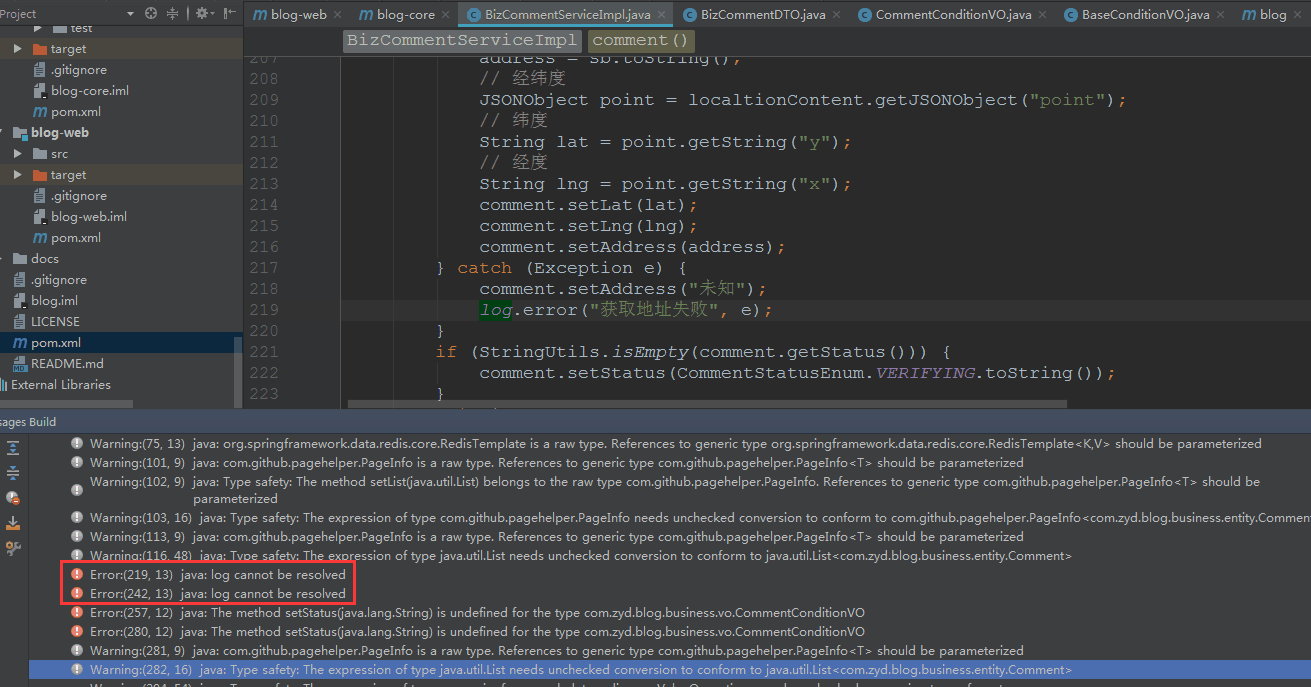
|
||||
**解决办法**
|
||||
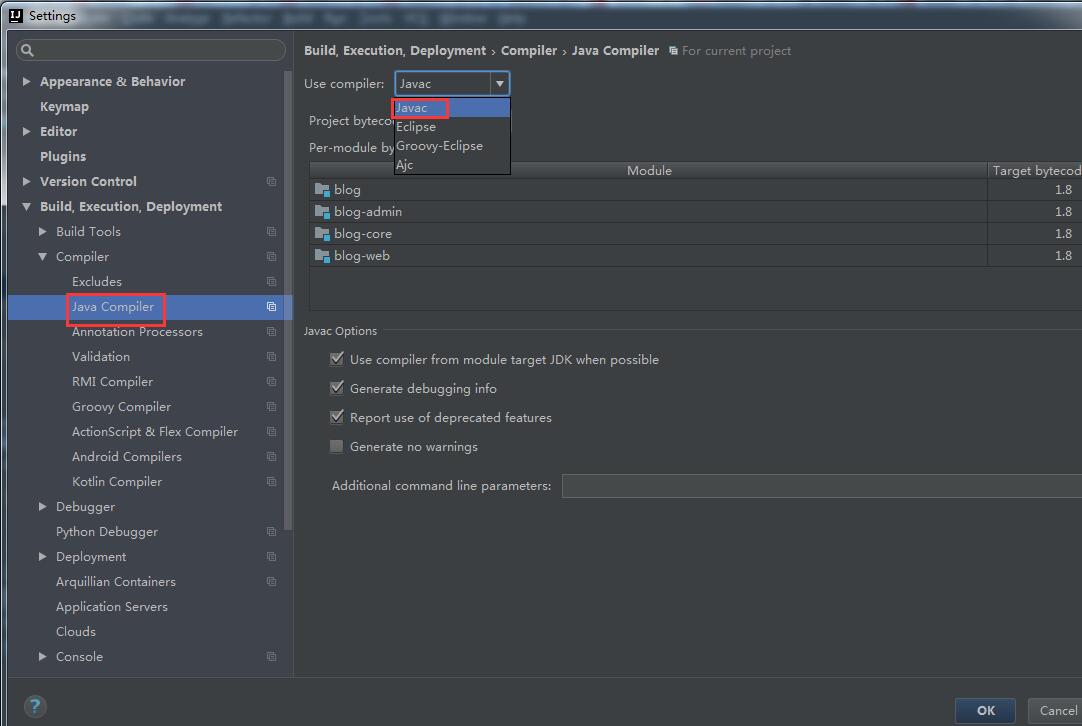
|
||||
默认是eclipse 选择javac就可以了
|
||||
|
||||
|
||||
## 2.~~升级到1.8.0后如何启用state?~~
|
||||
|
||||
~~在原api使用方法的基础上,为config追加一个state即可。~~
|
||||
```
|
||||
AuthRequest authRequest = new AuthGiteeRequest(AuthConfig.builder()
|
||||
.clientId("clientId")
|
||||
.clientSecret("clientSecret")
|
||||
.redirectUri("redirectUri")
|
||||
.state("state") // 就是这儿
|
||||
.build());
|
||||
```
|
||||
|
||||
## 3.~~升级到1.8.0后login方法报错?~~
|
||||
|
||||
~~这是因为1.8.0版本中新增了[AuthCallback](https://gitee.com/yadong.zhang/JustAuth/blob/master/src/main/java/me/zhyd/oauth/model/AuthCallback.java)类,这个类封装了所有可能的回调参数。目前包含以下三个参数:~~
|
||||
- ~~`code`: 访问AuthorizeUrl后回调时带的参数code,用来换取token~~
|
||||
- ~~`auth_code`: 支付宝授权登陆时不会返回code而是返回`auth_code`参数~~
|
||||
- ~~`state`: 访问AuthorizeUrl后回调时带的参数state,用于和请求AuthorizeUrl前的state比较,防止CSRF攻击~~
|
||||
|
||||
~~1.8.0版本之后的api,可以直接用AuthCallback类作为回调方法的入参,比如:~~
|
||||
```
|
||||
@RequestMapping("/callback/{source}")
|
||||
public Object login(@PathVariable("source") String source, AuthCallback callback) {
|
||||
System.out.println("进入callback:" + source + " callback params:" + JSONObject.toJSONString(callback));
|
||||
AuthRequest authRequest = getAuthRequest(source);
|
||||
AuthResponse response = authRequest.login(callback);
|
||||
System.out.println(JSONObject.toJSONString(response));
|
||||
return response;
|
||||
}
|
||||
```
|
||||
~~_代码截取自_ :https://github.com/justauth/JustAuth-demo~~
|
||||
|
||||
## 4.~~升级到1.8.0后对于state参数有什么特殊要求吗?~~
|
||||
|
||||
~~理论上没有,stata只是用来保持会话状态,因为http协议的无状态性,从授权到回调,无法感知具体是哪个用户触发的。所以可以使用state作为校验。注:state参数每次完整的授权链中只可用一次!(也是为了防止不必要的危险)~~
|
||||
|
||||
~~作者建议state命名格式如下:~~
|
||||
- ~~授权登录:`{source}_{ip}_{random}`~~
|
||||
- ~~账号绑定:`{source}_{userId}_{ip}_{random}`~~
|
||||
|
||||
~~其中`source`表示授权平台,可以直接去JustAuth中的source,`ip`为当前用户的ip(部分情况可能不适用),`random`为随机字符串,`userId`为当前登录用户的id。~~
|
||||
|
||||
~~注:`authorize`和`login`(不是指回调传回的`state`,而是声明`request`时传入的`state`)中传的`state`务必保证一致~~
|
||||
|
||||
## 5.升级到1.9.3+版本后编译失败
|
||||
|
||||
主要明显的就是`IpUtils.getIp`和request的`.state`报错。
|
||||
|
||||
这是因为从`v1.9.3`版本开始,对项目进行了一些优化,具体优化内容参考:[v1.9.3](https://gitee.com/yadong.zhang/JustAuth/releases/v1.9.3)和[v1.9.4](https://gitee.com/yadong.zhang/JustAuth/releases/v1.9.4)。
|
||||
|
||||
新版本的使用方式,参考[JustAuth-demo](https://github.com/justauth/JustAuth-demo/blob/master/src/main/java/me/zhyd/justauth/RestAuthController.java)
|
||||
```
|
||||
@RequestMapping("/render/{source}")
|
||||
public void renderAuth(@PathVariable("source") String source, HttpServletResponse response) throws IOException {
|
||||
AuthRequest authRequest = getAuthRequest(source);
|
||||
String authorizeUrl = authRequest.authorize(AuthStateUtils.createState());
|
||||
response.sendRedirect(authorizeUrl);
|
||||
}
|
||||
@RequestMapping("/callback/{source}")
|
||||
public Object login(@PathVariable("source") String source, AuthCallback callback) {
|
||||
AuthRequest authRequest = getAuthRequest(source);
|
||||
AuthResponse response = authRequest.login(callback);
|
||||
return response;
|
||||
}
|
||||
```
|
||||
|
||||
## 6.升级到最新版本后为什么支付宝登录不能用了?
|
||||
|
||||
在升级到新版后,使用支付宝登录会提示`ClassNotFoundExcption`异常,这是因为从`1.9.4`版本开始,JustAuth将不在强依赖`alipay-sdk-java`,如果你需要用到Alipay的授权登陆,那么你还需要添加以下依赖:
|
||||
|
||||
```
|
||||
<dependency>
|
||||
<groupId>com.alipay.sdk</groupId>
|
||||
<artifactId>alipay-sdk-java</artifactId>
|
||||
<version>3.7.4.ALL</version>
|
||||
</dependency>
|
||||
```
|
||||
|
||||
## 7.“Scope参数错误或者Scope没有权限”是怎么回事?
|
||||
|
||||
微信开放平台授权登录提示“Scope参数错误或者Scope没有权限”
|
||||
|
||||

|
||||
|
||||
解决办法:请检查微信开放平台的应用是否有“微信登录”接口的权限。
|
||||
|
||||

|
||||
|
||||
“接口状态”必须为“已获得”!
|
||||
|
||||
## 8.微信登录时能在微信端提示登录成功吗?
|
||||
|
||||
不可以,这是**微信公众平台**的功能,截至到目前(JustAuth v1.12.0)为止,暂不支持**微信公众平台**的授权登录
|
||||
|
||||
## 9.微信登录时能不需要手机确认吗?扫码后就自动登录
|
||||
|
||||
不可以,微信开放平台不支持这种操作。可以把微信扫码登录理解成qq用账号密码登录,扫完码后不手动点确认,微信怎么知道用户是否同意了授权?
|
||||
当然,**微信公众平台**的授权流程可以越过这个限制,只要关注了公众号,后续扫码成功后就会自动登录,但是这是**微信公众平台**的功能,截至到目前(JustAuth v1.12.0)为止,暂不支持**微信公众平台**的授权登录
|
||||
|
||||
## 10.本地如何测那些*不支持本地地址回调*的授权登录?
|
||||
|
||||
推荐几种方案:
|
||||
1. 改`hosts`,然后将测试程序的端口改为`80`
|
||||
2. 使用`Nginx`/`Apache`做代理
|
||||
3. FRP内网穿透,参考地址:[使用内网穿透的方式集成第三方登录](https://xkcoding.com/2019/05/22/spring-boot-login-with-oauth.html)
|
||||
|
||||
## 11.如何获取QQ登录的`unionId`?
|
||||
|
||||
在AuthConfig中设备`unionId`为`true`
|
||||
|
||||
```java
|
||||
AuthRequest authRequest = new AuthQqRequest(AuthConfig.builder()
|
||||
.clientId("clientId")
|
||||
.clientSecret("clientSecret")
|
||||
.redirectUri("redirectUri")
|
||||
.unionId(true)
|
||||
.build());
|
||||
```
|
||||
> 注:使用unionId要求开发者必须已在qq开放平台申请了获取unionId的权限,否则可能会发生错误!切记!参考链接:[unionid介绍](http://wiki.connect.qq.com/unionid%E4%BB%8B%E7%BB%8D)
|
||||
|
||||
## 12. `AuthCallback`报错?
|
||||
|
||||
在使用JustAuth 1.13.0时,遇到如下所示错误:
|
||||

|
||||
|
||||
这是因为我没有做好代码审查和测试,所以才导致的问题。我检讨!深刻的检讨!
|
||||
|
||||
请遇到该问题的朋友及时升级到最新版本(`1.13.1`修复该问题)
|
||||
|
||||
ps: 我要去祭天了
|
||||
|
||||
|
||||
@@ -1,110 +0,0 @@
|
||||
<p align="center">
|
||||
<a href="https://docs.justauth.whnb.wang"><img src="./_media/cover.png" width="400"></a>
|
||||
</p>
|
||||
<p align="center">
|
||||
<strong>Login, so easy!</strong>
|
||||
</p>
|
||||
<p align="center">
|
||||
<strong>史上最全的整合第三方登录的开源库</strong>
|
||||
</p>
|
||||
<p align="center">
|
||||
<a target="_blank" href="https://search.maven.org/search?q=JustAuth">
|
||||
<img src="https://img.shields.io/badge/Maven%20Central--1.15.3-alpha-blue" ></img>
|
||||
</a>
|
||||
<a target="_blank" href="https://gitee.com/yadong.zhang/JustAuth/blob/master/LICENSE">
|
||||
<img src="https://img.shields.io/apm/l/vim-mode.svg?color=yellow" ></img>
|
||||
</a>
|
||||
<a target="_blank" href="https://www.oracle.com/technetwork/java/javase/downloads/index.html">
|
||||
<img src="https://img.shields.io/badge/JDK-1.8+-green.svg" ></img>
|
||||
</a>
|
||||
<a target="_blank" href="https://apidoc.gitee.com/yadong.zhang/JustAuth/" title="API文档">
|
||||
<img src="https://img.shields.io/badge/Api%20Docs--1.15.3-alpha-latest-orange" ></img>
|
||||
</a>
|
||||
<a target="_blank" href="https://docs.justauth.whnb.wang" title="参考文档">
|
||||
<img src="https://img.shields.io/badge/Docs-latest-blueviolet.svg" ></img>
|
||||
</a>
|
||||
<a href="https://codecov.io/gh/zhangyd-c/JustAuth">
|
||||
<img src="https://codecov.io/gh/zhangyd-c/JustAuth/branch/master/graph/badge.svg" />
|
||||
</a>
|
||||
<a href='https://gitee.com/yadong.zhang/JustAuth/stargazers'>
|
||||
<img src='https://gitee.com/yadong.zhang/JustAuth/badge/star.svg?theme=white' alt='star'></img>
|
||||
</a>
|
||||
<a target="_blank" href='https://github.com/zhangyd-c/JustAuth'>
|
||||
<img src="https://img.shields.io/github/stars/zhangyd-c/JustAuth.svg?style=social" alt="github star"></img>
|
||||
</a>
|
||||
</p>
|
||||
<p align="center">
|
||||
<strong>开源地址:</strong> <a target="_blank" href='https://gitee.com/yadong.zhang/JustAuth'>Gitee</a> | <a target="_blank" href='https://github.com/zhangyd-c/JustAuth'>Github</a>
|
||||
</p>
|
||||
<p align="center">
|
||||
<strong>QQ群:</strong>230017570
|
||||
</p>
|
||||
<p align="center">
|
||||
<strong>文档更新日期:</strong> {docsify-updated}
|
||||
</p>
|
||||
|
||||
## 简介
|
||||
|
||||
JustAuth,如你所见,它仅仅是一个**第三方授权登录**的**工具类库**,它可以让我们脱离繁琐的第三方登录SDK,让登录变得**So easy!**
|
||||
|
||||
## 特点
|
||||
|
||||
废话不多说,就俩字:
|
||||
|
||||
1. **全**:已集成十多家第三方平台(国内外常用的基本都已包含),仍然还在持续扩展中([开发计划](https://gitee.com/yadong.zhang/JustAuth/issues/IUGRK))!
|
||||
2. **简**:API就是奔着最简单去设计的,尽量让您用起来没有障碍感!
|
||||
|
||||
## 项目关注度趋势
|
||||
|
||||
[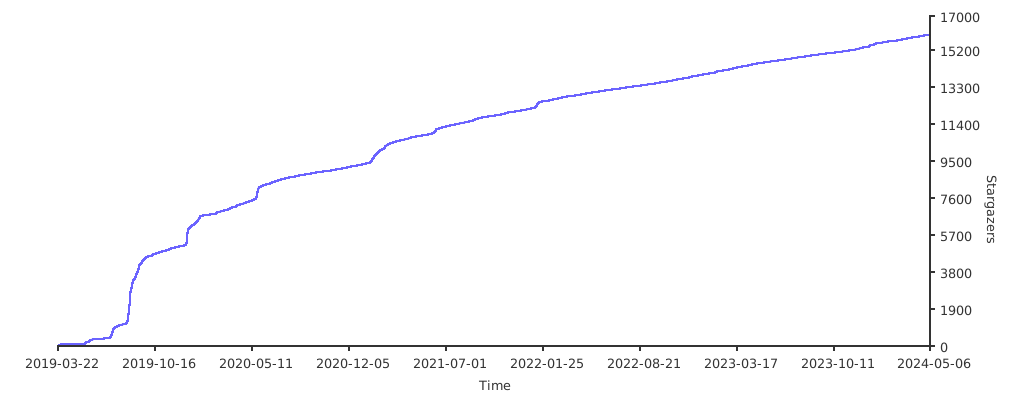](https://starchart.cc/justauth/JustAuth)
|
||||
|
||||
<a href="https://www.producthunt.com/posts/justauth?utm_source=badge-featured&utm_medium=badge&utm_souce=badge-justauth" target="_blank"><img src="https://api.producthunt.com/widgets/embed-image/v1/featured.svg?post_id=196886&theme=dark" alt="JustAuth - Login, so easy! | Product Hunt Embed" style="width: 250px; height: 54px;" width="250px" height="54px" /></a>
|
||||
|
||||
## 参与&贡献
|
||||
|
||||
JustAuth的发展离不开朋友们的支持,时至今日,JustAuth已渐趋完善,但仍有很大的改善空间。欢迎各位朋友为JustAuth贡献一份力量。
|
||||
|
||||
### 提供bug或建议
|
||||
|
||||
- [Gitee](https://gitee.com/yadong.zhang/JustAuth/issues)
|
||||
- [Github](https://github.com/justauth/JustAuth/issues)
|
||||
|
||||
如果你正在使用JustAuth,可以在这儿留下你的足迹,获得优先推送、曝光
|
||||
|
||||
- [Gitee](https://gitee.com/yadong.zhang/JustAuth/issues/IZ2T7)
|
||||
- [Github](https://github.com/justauth/JustAuth/issues/17)
|
||||
|
||||
### 贡献代码的步骤
|
||||
|
||||
1. fork本项目到自己的repo
|
||||
2. 把fork过去的项目也就是你仓库中的项目clone到你本地
|
||||
3. 修改代码(`dev`分支)
|
||||
4. commit后push到自己的仓库
|
||||
5. 发起PR(pull request) 请求,提交到`dev`分支
|
||||
6. 等待合并
|
||||
|
||||
### 注意事项
|
||||
|
||||
1. JustAuth只接受集成**OAuth2.0**的平台
|
||||
2. 建议安装“**阿里编码规约**”插件,然后进行开发
|
||||
3. 提交PR前请格式化好自己的代码
|
||||
4. 注释规范,自定义的方法一定要加上:方法说明、参数说明、返回值说明等
|
||||
|
||||
## 功能尝鲜
|
||||
|
||||
JustAuth一共有两个主要分支:
|
||||
- 线上版分支(master):稳定版,发布版就是这个分支的代码
|
||||
- 开发版分支(dev):不保证稳定,新功能都会优先推送到该分支,对于想尝鲜的朋友,可以直接下载代码,然后源码编译dev分支
|
||||
|
||||
## 开源推荐
|
||||
- `spring-boot-demo` 深度学习并实战 spring boot 的项目: [https://github.com/xkcoding/spring-boot-demo](https://github.com/xkcoding/spring-boot-demo)
|
||||
- `mica` SpringBoot 微服务高效开发工具集: [https://github.com/lets-mica/mica](https://github.com/lets-mica/mica)
|
||||
- `pig` 宇宙最强微服务认证授权脚手架(架构师必备): [https://gitee.com/log4j/pig](https://gitee.com/log4j/pig)
|
||||
- `SpringBlade` 完整的线上解决方案(企业开发必备): https://gitee.com/smallc/SpringBlade
|
||||
|
||||
## 捐赠
|
||||
|
||||
| 支付宝 | 微信 |
|
||||
| :------------: | :------------: |
|
||||
| <img src="https://gitee.com/yadong.zhang/static/raw/master/qrcode/zfb_code.png" width="200"/> | <img src="https://gitee.com/yadong.zhang/static/raw/master/qrcode/wx_code.png" width="200" /> |
|
||||
|
||||
@@ -1,42 +0,0 @@
|
||||
# :alien: 404:alien:
|
||||
|
||||
**非常感谢您对JustAuth的关注**,您现在查询的内容,作者正在补充中!
|
||||
|
||||
您可能对以下文章感兴趣:
|
||||
|
||||
- [OAuth的授权流程是什么样的?](https://docs.justauth.whnb.wang/#/oauth)
|
||||
- [如何使用JustAuth?](https://docs.justauth.whnb.wang/#/how-to-use)
|
||||
- [提问与回答?](https://docs.justauth.whnb.wang/#/Q&A)
|
||||
- [如何集成Github?](https://docs.justauth.whnb.wang/#/oauth/github)
|
||||
- [如何集成Gitee?](https://docs.justauth.whnb.wang/#/oauth/gitee)
|
||||
- [如何集成支付宝?](https://docs.justauth.whnb.wang/#/oauth/alipay)
|
||||
- [如何自定义state?](https://docs.justauth.whnb.wang/#/customize-the-state-cache)
|
||||
- [如何自定义接入自己搭建的oauth平台?](https://docs.justauth.whnb.wang/#/customize-the-oauth)
|
||||
- [有哪些配套项目?](https://docs.justauth.whnb.wang/#/supporting)
|
||||
|
||||
### 想使用JustAuth集成第三方OAuth登录?
|
||||
|
||||
- [Gitee登录](oauth/gitee.md)
|
||||
- [Github登录](oauth/github.md)
|
||||
- [qq登录](oauth/qq.md)
|
||||
- [微信开放平台登录](oauth/wechat_open.md)
|
||||
- [微博登录](oauth/weibo.md)
|
||||
- [支付宝登录](oauth/alipay.md)
|
||||
- [酷家乐登录](oauth/kujiale.md)
|
||||
- 更多文章,正在补充中...
|
||||
|
||||
|
||||
### 如果还是没有您想要的内容,您可以:
|
||||
|
||||
1. (建议) 提Issue: 【[github](https://github.com/justauth/JustAuth/issues)】 | 【[gitee](https://gitee.com/yadong.zhang/JustAuth/issues)】
|
||||
2. 点击本页面右下角【OPEN CHAT】开始在线聊天
|
||||
3. 本页面底部直接留言
|
||||
4. 关注公众号(公众号会不定期推送相关内容),扫下方二维码关注公众号:
|
||||
|
||||
<img src="https://gitee.com/yadong.zhang/static/raw/master/wx/wechat_account.jpg" width="200" />
|
||||
|
||||
4. 加微信群(群内有各个优秀开源项目的作者和技术大神),微信扫下方二维码后加我好友(**注:一定要备注JustAUth,无备注的一律不加**):
|
||||
|
||||
<img src="https://gitee.com/yadong.zhang/static/raw/master/wx/wx.png" width="170"/>
|
||||
|
||||
5. 加QQ群:QQ搜索`230017570`(该QQ群为JustAuth官方技术讨论群,禁止群内打广告!)
|
||||
@@ -1,16 +0,0 @@
|
||||
|
||||

|
||||
# JustAuth <small>1.15.3-alpha</small>
|
||||
|
||||
<strong>史上最全的整合第三方登录的开源库</strong>
|
||||
|
||||
<strong>Login, so easy</strong>
|
||||
|
||||
<p>已集成国内外十多家平台</p>
|
||||
<p>极简的API设计</p>
|
||||
|
||||
|
||||
[Gitee](https://gitee.com/yadong.zhang/JustAuth)
|
||||
[Github](https://github.com/zhangyd-c/JustAuth)
|
||||
[Get Started](#简介)
|
||||
|
||||

|
Before Width: | Height: | Size: 16 KiB |

|
Before Width: | Height: | Size: 25 KiB |

|
Before Width: | Height: | Size: 93 KiB |

|
Before Width: | Height: | Size: 23 KiB |

|
Before Width: | Height: | Size: 67 KiB |

|
Before Width: | Height: | Size: 158 KiB |

|
Before Width: | Height: | Size: 59 KiB |

|
Before Width: | Height: | Size: 4.0 KiB |

|
Before Width: | Height: | Size: 10 KiB |

|
Before Width: | Height: | Size: 882 KiB |

|
Before Width: | Height: | Size: 377 KiB |

|
Before Width: | Height: | Size: 103 KiB |

|
Before Width: | Height: | Size: 88 KiB |

|
Before Width: | Height: | Size: 60 KiB |

|
Before Width: | Height: | Size: 19 KiB |

|
Before Width: | Height: | Size: 86 KiB |

|
Before Width: | Height: | Size: 38 KiB |

|
Before Width: | Height: | Size: 97 KiB |

|
Before Width: | Height: | Size: 25 KiB |

|
Before Width: | Height: | Size: 9.9 KiB |

|
Before Width: | Height: | Size: 33 KiB |

|
Before Width: | Height: | Size: 46 KiB |

|
Before Width: | Height: | Size: 1.3 MiB |

|
Before Width: | Height: | Size: 62 KiB |

|
Before Width: | Height: | Size: 54 KiB |

|
Before Width: | Height: | Size: 96 KiB |

|
Before Width: | Height: | Size: 131 KiB |

|
Before Width: | Height: | Size: 162 KiB |

|
Before Width: | Height: | Size: 164 KiB |

|
Before Width: | Height: | Size: 105 KiB |

|
Before Width: | Height: | Size: 184 KiB |

|
Before Width: | Height: | Size: 26 KiB |

|
Before Width: | Height: | Size: 193 KiB |

|
Before Width: | Height: | Size: 24 KiB |

|
Before Width: | Height: | Size: 42 KiB |

|
Before Width: | Height: | Size: 38 KiB |

|
Before Width: | Height: | Size: 45 KiB |

|
Before Width: | Height: | Size: 48 KiB |

|
Before Width: | Height: | Size: 63 KiB |

|
Before Width: | Height: | Size: 56 KiB |

|
Before Width: | Height: | Size: 30 KiB |

|
Before Width: | Height: | Size: 74 KiB |

|
Before Width: | Height: | Size: 45 KiB |

|
Before Width: | Height: | Size: 30 KiB |

|
Before Width: | Height: | Size: 40 KiB |

|
Before Width: | Height: | Size: 29 KiB |

|
Before Width: | Height: | Size: 79 KiB |

|
Before Width: | Height: | Size: 34 KiB |

|
Before Width: | Height: | Size: 60 KiB |

|
Before Width: | Height: | Size: 124 KiB |

|
Before Width: | Height: | Size: 43 KiB |

|
Before Width: | Height: | Size: 183 KiB |

|
Before Width: | Height: | Size: 84 KiB |

|
Before Width: | Height: | Size: 43 KiB |

|
Before Width: | Height: | Size: 27 KiB |

|
Before Width: | Height: | Size: 4.3 KiB |

|
Before Width: | Height: | Size: 11 KiB |
@@ -1,49 +0,0 @@
|
||||
- [入门和使用](README.md)
|
||||
- [贡献者名单](contributors.md)
|
||||
- 快速开始
|
||||
- [名词解释](explain.md)
|
||||
- [OAuth流程](oauth.md)
|
||||
- [如何使用](how-to-use.md)
|
||||
- [Q&A](Q&A.md)
|
||||
- 集成第三方
|
||||
- [√ Gitee登录](oauth/gitee.md)
|
||||
- [√ Github登录](oauth/github.md)
|
||||
- [√ qq登录](oauth/qq.md)
|
||||
- [√ 微信开放平台登录](oauth/wechat_open.md)
|
||||
- [√ 微博登录](oauth/weibo.md)
|
||||
- [√ 支付宝登录](oauth/alipay.md)
|
||||
- [√ 酷家乐登录](oauth/kujiale.md)
|
||||
- [CSDN登录](oauth/csdn.md)
|
||||
- [微信企业版登录](oauth/wechatEnterprise.md)
|
||||
- [微信公众平台登录](oauth/wechat_mp.md)
|
||||
- [百度登录](oauth/baidu.md)
|
||||
- [Coding登录](oauth/coding.md)
|
||||
- [钉钉登录](oauth/dingtalk.md)
|
||||
- [开源中国登录](oauth/oschina.md)
|
||||
- [淘宝登录](oauth/taobao.md)
|
||||
- [腾讯云登录](oauth/tencentCloud.md)
|
||||
- [Google登录](oauth/google.md)
|
||||
- [Facebook登录](oauth/facebook.md)
|
||||
- [抖音登录](oauth/douyin.md)
|
||||
- [领英登录](oauth/linkedin.md)
|
||||
- [微软登录](oauth/microsoft.md)
|
||||
- [小米登录](oauth/mi.md)
|
||||
- [头条登录](oauth/toutiao.md)
|
||||
- [Teambition登录](oauth/teambition.md)
|
||||
- [人人登录](oauth/renren.md)
|
||||
- [Pinterest登录](oauth/pinterest.md)
|
||||
- [Stackoverflow登录](oauth/stackoverflow.md)
|
||||
- [华为登录](oauth/huawei.md)
|
||||
- [Gitlab登录](oauth/gitlab.md)
|
||||
- [美团登录](oauth/meituan.md)
|
||||
- [饿了么登录](oauth/eleme.md)
|
||||
- [飞书登录](oauth/feishu.md)
|
||||
- 高级特性
|
||||
- [使用State](using-state.md)
|
||||
- [自定义state缓存](customize-the-state-cache.md)
|
||||
- [自定义第三方平台的OAuth](customize-the-oauth.md)
|
||||
- 扩展内容
|
||||
- [JustAuth与现有用户系统整合](extended/justauth_integrated_with_the_existing_account_system.md)
|
||||
- [Who is using](users.md)
|
||||
- [致谢](thx.md)
|
||||
- [更新记录](update.md)
|
||||
@@ -1,7 +0,0 @@
|
||||
(敬请期待...)
|
||||
|
||||
## 1. 申请应用
|
||||
|
||||
## 2. 集成JustAuth
|
||||
|
||||
## 3. 授权结果
|
||||
@@ -1,7 +0,0 @@
|
||||
(敬请期待...)
|
||||
|
||||
## 1. 申请应用
|
||||
|
||||
## 2. 集成JustAuth
|
||||
|
||||
## 3. 授权结果
|
||||
@@ -1,7 +0,0 @@
|
||||
(敬请期待...)
|
||||
|
||||
## 1. 申请应用
|
||||
|
||||
## 2. 集成JustAuth
|
||||
|
||||
## 3. 授权结果
|
||||
@@ -1,7 +0,0 @@
|
||||
(敬请期待...)
|
||||
|
||||
## 1. 申请应用
|
||||
|
||||
## 2. 集成JustAuth
|
||||
|
||||
## 3. 授权结果
|
||||
@@ -1,7 +0,0 @@
|
||||
(敬请期待...)
|
||||
|
||||
## 1. 申请应用
|
||||
|
||||
## 2. 集成JustAuth
|
||||
|
||||
## 3. 授权结果
|
||||
@@ -1,7 +0,0 @@
|
||||
(敬请期待...)
|
||||
|
||||
## 1. 申请应用
|
||||
|
||||
## 2. 集成JustAuth
|
||||
|
||||
## 3. 授权结果
|
||||
@@ -1,7 +0,0 @@
|
||||
(敬请期待...)
|
||||
|
||||
## 1. 申请应用
|
||||
|
||||
## 2. 集成JustAuth
|
||||
|
||||
## 3. 授权结果
|
||||
@@ -1,7 +0,0 @@
|
||||
(敬请期待...)
|
||||
|
||||
## 1. 申请应用
|
||||
|
||||
## 2. 集成JustAuth
|
||||
|
||||
## 3. 授权结果
|
||||
@@ -1,7 +0,0 @@
|
||||
(敬请期待...)
|
||||
|
||||
## 1. 申请应用
|
||||
|
||||
## 2. 集成JustAuth
|
||||
|
||||
## 3. 授权结果
|
||||
@@ -1,7 +0,0 @@
|
||||
(敬请期待...)
|
||||
|
||||
## 1. 申请应用
|
||||
|
||||
## 2. 集成JustAuth
|
||||
|
||||
## 3. 授权结果
|
||||
@@ -1,7 +0,0 @@
|
||||
(敬请期待...)
|
||||
|
||||
## 1. 申请应用
|
||||
|
||||
## 2. 集成JustAuth
|
||||
|
||||
## 3. 授权结果
|
||||
@@ -1,7 +0,0 @@
|
||||
(敬请期待...)
|
||||
|
||||
## 1. 申请应用
|
||||
|
||||
## 2. 集成JustAuth
|
||||
|
||||
## 3. 授权结果
|
||||
@@ -1,7 +0,0 @@
|
||||
(敬请期待...)
|
||||
|
||||
## 1. 申请应用
|
||||
|
||||
## 2. 集成JustAuth
|
||||
|
||||
## 3. 授权结果
|
||||
@@ -1,7 +0,0 @@
|
||||
(敬请期待...)
|
||||
|
||||
## 1. 申请应用
|
||||
|
||||
## 2. 集成JustAuth
|
||||
|
||||
## 3. 授权结果
|
||||
@@ -1,7 +0,0 @@
|
||||
(敬请期待...)
|
||||
|
||||
## 1. 申请应用
|
||||
|
||||
## 2. 集成JustAuth
|
||||
|
||||
## 3. 授权结果
|
||||
@@ -1,7 +0,0 @@
|
||||
(敬请期待...)
|
||||
|
||||
## 1. 申请应用
|
||||
|
||||
## 2. 集成JustAuth
|
||||
|
||||
## 3. 授权结果
|
||||
@@ -1,7 +0,0 @@
|
||||
(敬请期待...)
|
||||
|
||||
## 1. 申请应用
|
||||
|
||||
## 2. 集成JustAuth
|
||||
|
||||
## 3. 授权结果
|
||||
@@ -1,7 +0,0 @@
|
||||
(敬请期待...)
|
||||
|
||||
## 1. 申请应用
|
||||
|
||||
## 2. 集成JustAuth
|
||||
|
||||
## 3. 授权结果
|
||||
@@ -1,7 +0,0 @@
|
||||
(敬请期待...)
|
||||
|
||||
## 1. 申请应用
|
||||
|
||||
## 2. 集成JustAuth
|
||||
|
||||
## 3. 授权结果
|
||||
@@ -1,7 +0,0 @@
|
||||
(敬请期待...)
|
||||
|
||||
## 1. 申请应用
|
||||
|
||||
## 2. 集成JustAuth
|
||||
|
||||
## 3. 授权结果
|
||||
@@ -1,7 +0,0 @@
|
||||
(敬请期待...)
|
||||
|
||||
## 1. 申请应用
|
||||
|
||||
## 2. 集成JustAuth
|
||||
|
||||
## 3. 授权结果
|
||||
@@ -1,7 +0,0 @@
|
||||
(敬请期待...)
|
||||
|
||||
## 1. 申请应用
|
||||
|
||||
## 2. 集成JustAuth
|
||||
|
||||
## 3. 授权结果
|
||||
@@ -1,7 +0,0 @@
|
||||
(敬请期待...)
|
||||
|
||||
## 1. 申请应用
|
||||
|
||||
## 2. 集成JustAuth
|
||||
|
||||
## 3. 授权结果
|
||||
@@ -1,10 +0,0 @@
|
||||
(敬请期待...)
|
||||
|
||||
### 声明:
|
||||
此文档适用于**微信公众平台**!
|
||||
|
||||
## 1. 申请应用
|
||||
|
||||
## 2. 集成JustAuth
|
||||
|
||||
## 3. 授权结果
|
||||
@@ -1,36 +0,0 @@
|
||||
# 项目贡献者名单
|
||||
|
||||
> 排序不分先后
|
||||
|
||||
- <img src="https://avatar.gitee.com/uploads/99/784199_yadong.zhang.png!avatar100?1462325358" width="20"> · yadong.zhang : <a href="https://github.com/zhangyd-c" target="_blank">[Github]</a> | <a href="https://gitee.com/yadong.zhang" target="_blank">[Gitee]</a> | <a href="https://www.zhyd.me" target="_blank">[个人网站]</a>
|
||||
- <img src="https://avatars0.githubusercontent.com/u/10429917?s=460&v=4" width="20"> · yangkai.shen : <a href="https://github.com/xkcoding" target="_blank">[Github]</a> | <a href="https://xkcoding.com" target="_blank">[个人网站]</a>
|
||||
- 集成微信登录、QQ登录、Google登录、微软登录、小米登录、企业微信登录
|
||||
- 优化代码、架构,增加自定义缓存
|
||||
- 提供jFinal版demo
|
||||
- 提供ActFramework版demo
|
||||
- 提供SpringBoot快速集成的justauth-spring-boot-starter
|
||||
- <img src="https://avatars2.githubusercontent.com/u/2988765?s=115&v=4" width="20"> · pengisgood : <a href="https://github.com/pengisgood" target="_blank">[Github]</a> | <a href="https://pengisgood.github.io" target="_blank">[个人网站]</a>
|
||||
- 集成人人登录、Pinterest登录、StackOverflow登录、Twitter登录
|
||||
- <img src="https://avatar.gitee.com/uploads/51/1651_dolphinboy.png!avatar100?1479346570" width="20"> · skqing : <a href="https://gitee.com/skqing" target="_blank">[Gitee]</a> | <a href="https://my.oschina.net/dolphinboy" target="_blank">[个人网站]</a>
|
||||
- 修复钉钉登录的部分问题
|
||||
- 优化微博登录
|
||||
- <img src="https://avatars1.githubusercontent.com/u/47110161?s=88&v=4" width="20"> · dyc12ii : <a href="https://github.com/dyc12ii" target="_blank">[Gitee]</a>
|
||||
- 升级fastjson版本至1.2.58
|
||||
- <img src="https://gitee.com/uploads/22/4981222_harryleexyz.png?1556524275" width="20"> · harrylee : <a href="https://gitee.com/harryleexyz" target="_blank">[Gitee]</a>
|
||||
- 升级fastjson依赖到1.2.60
|
||||
- 集成京东登录
|
||||
- <img src="https://avatars3.githubusercontent.com/u/32814990?s=460&v=4" width="20"> · Veigar : <a href="https://github.com/wuweiqi1993" target="_blank">[Github]</a>
|
||||
- 集成酷家乐登录
|
||||
- <img src="https://avatar.gitee.com/uploads/24/1280924_TopCoderMyDream.png!avatar200?1523763232" width="20"> · 蛋蛋 : <a href="https://gitee.com/TopCoderMyDream" target="_blank">[Gitee]</a> | <a href="https://github.com/EggsBlue" target="_blank">[Github]</a>
|
||||
- 提供NutzBoot版的demo项目
|
||||
- <img src="https://avatars0.githubusercontent.com/u/35978114?s=180&v=4" width="20"> · Braavos96 : <a href="https://github.com/Braavos96" target="_blank">[Github]</a>
|
||||
- 添加测试用例:UrlBuilder 、GlobalAuthUtil
|
||||
- <img src="https://avatars0.githubusercontent.com/u/283483?s=180&v=4" width="20"> · Chris Smowton : <a href="https://github.com/smowton" target="_blank">[Github]</a>
|
||||
- 添加测试用例:StringUtils
|
||||
- <img src="https://avatars1.githubusercontent.com/u/31759178?s=88&v=4" width="20"> · githubeacon : <a href="https://github.com/githubeacon" target="_blank">[Github]</a>
|
||||
- 增加飞书授权登录
|
||||
- <img src="https://avatars3.githubusercontent.com/u/20242284?s=88&u=2aeb7576bd61392e9fd94227d2b3048a9aea6f73&v=4" width="20"> · runningzyp : <a href="https://github.com/runningzyp" target="_blank">[Github]</a>
|
||||
- 修改文案错误
|
||||
- 千年等一回,我只为等你...
|
||||
|
||||
ps: 如有遗漏,请告知
|
||||
@@ -1,209 +0,0 @@
|
||||
# 自定义第三方平台的OAuth
|
||||
|
||||
[JustAuth](https://github.com/justauth/JustAuth)发展到现在,基本上已经涵盖了国内外大多数知名的网站。[JustAuth](https://github.com/justauth/JustAuth)也一直以它的**全**和**简**,备受各位朋友的厚爱、支持。
|
||||
|
||||
但现在OAuth技术越来越成熟,越来越多的个人站长或者企业都开始搭建自己的OAuth授权平台,那么针对这种情况,[JustAuth](https://github.com/justauth/JustAuth)并不能做到面面俱到,无法去集成所有支持OAuth的网站(这也是不现实的)。
|
||||
|
||||
既然考虑到有这种需求,那么就要想办法解决,想办法填补漏洞,不为了自己,也为了陪伴[JustAuth](https://github.com/justauth/JustAuth)一路走来的所有朋友们。
|
||||
|
||||
[JustAuth](https://github.com/justauth/JustAuth)开发团队也在[v1.12.0](https://github.com/justauth/JustAuth/releases/tag/v1.12.0)版本中新加入了一大特性,就是可以支持任意支持OAuth的网站通过JustAuth实现便捷的OAuth登录!
|
||||
|
||||
下面我们会通过一个小例子,讲解如何使用JustAuth集成自己搭建的GitLab服务。
|
||||
|
||||
> 注:本节将会使用[JustAuth-demo](https://github.com/justauth/JustAuth-demo)Demo项目进行演示
|
||||
|
||||
## 搭建Gitlab服务
|
||||
|
||||
请自行解决,如果已有搭建好的Gitlab私服,请直接进入下面的步骤
|
||||
|
||||
## 创建应用
|
||||
|
||||

|
||||

|
||||
|
||||
## 实现AuthSource接口
|
||||
|
||||
`AuthSource.java`是为了提供OAuth平台的API地址的统一接口,提供以下方法供实现:
|
||||
- `AuthSource#authorize()`: 获取授权url. 必须实现
|
||||
- `AuthSource#accessToken()`: 获取accessToken的url. 必须实现
|
||||
- `AuthSource#userInfo()`: 获取用户信息的url. 必须实现
|
||||
- `AuthSource#revoke()`: 获取取消授权的url. 非必须实现接口(部分平台不支持)
|
||||
- `AuthSource#refresh()`: 获取刷新授权的url. 非必须实现接口(部分平台不支持)
|
||||
|
||||
**注:**
|
||||
- 当通过JustAuth扩展实现第三方授权时,请参考`AuthDefaultSource`自行创建对应的枚举类并实现`AuthSource`接口
|
||||
- 如果不是使用的枚举类,那么在授权成功后获取用户信息时,需要**单独处理source字段**的赋值
|
||||
- 如果扩展了对应枚举类时,在`me.zhyd.oauth.request.AuthRequest#login(AuthCallback)`中可以通过`xx.toString()`获取对应的source
|
||||
|
||||
```java
|
||||
package me.zhyd.justauth;
|
||||
|
||||
import me.zhyd.oauth.config.AuthSource;
|
||||
|
||||
/**
|
||||
* @author yadong.zhang (yadong.zhang0415(a)gmail.com)
|
||||
* @version 1.0
|
||||
* @website https://www.zhyd.me
|
||||
* @date 2019/10/26 16:54
|
||||
* @since 1.8
|
||||
*/
|
||||
public enum AuthCustomSource implements AuthSource {
|
||||
|
||||
/**
|
||||
* 自己搭建的gitlab私服
|
||||
*/
|
||||
MYGITLAB {
|
||||
/**
|
||||
* 授权的api
|
||||
*
|
||||
* @return url
|
||||
*/
|
||||
@Override
|
||||
public String authorize() {
|
||||
return "http://gitlab.xxx.com/oauth/authorize";
|
||||
}
|
||||
|
||||
/**
|
||||
* 获取accessToken的api
|
||||
*
|
||||
* @return url
|
||||
*/
|
||||
@Override
|
||||
public String accessToken() {
|
||||
return "http://gitlab.xxx.com/oauth/token";
|
||||
}
|
||||
|
||||
/**
|
||||
* 获取用户信息的api
|
||||
*
|
||||
* @return url
|
||||
*/
|
||||
@Override
|
||||
public String userInfo() {
|
||||
return "http://gitlab.xxx.com/api/v4/user";
|
||||
}
|
||||
}
|
||||
}
|
||||
```
|
||||
|
||||
## 创建自定义的Request
|
||||
|
||||
```java
|
||||
package me.zhyd.justauth;
|
||||
|
||||
import cn.hutool.http.HttpResponse;
|
||||
import com.alibaba.fastjson.JSONObject;
|
||||
import me.zhyd.oauth.cache.AuthStateCache;
|
||||
import me.zhyd.oauth.config.AuthConfig;
|
||||
import me.zhyd.oauth.enums.AuthUserGender;
|
||||
import me.zhyd.oauth.exception.AuthException;
|
||||
import me.zhyd.oauth.model.AuthCallback;
|
||||
import me.zhyd.oauth.model.AuthToken;
|
||||
import me.zhyd.oauth.model.AuthUser;
|
||||
import me.zhyd.oauth.request.AuthDefaultRequest;
|
||||
import me.zhyd.oauth.utils.UrlBuilder;
|
||||
|
||||
/**
|
||||
* @author yadong.zhang (yadong.zhang0415(a)gmail.com)
|
||||
* @version 1.0
|
||||
* @website https://www.zhyd.me
|
||||
* @date 2019/10/26 17:00
|
||||
* @since 1.8
|
||||
*/
|
||||
public class AuthMyGitlabRequest extends AuthDefaultRequest {
|
||||
|
||||
|
||||
public AuthMyGitlabRequest(AuthConfig config) {
|
||||
super(config, AuthCustomSource.MYGITLAB);
|
||||
}
|
||||
|
||||
public AuthMyGitlabRequest(AuthConfig config, AuthStateCache authStateCache) {
|
||||
super(config, AuthCustomSource.MYGITLAB, authStateCache);
|
||||
}
|
||||
|
||||
@Override
|
||||
protected AuthToken getAccessToken(AuthCallback authCallback) {
|
||||
HttpResponse response = doPostAuthorizationCode(authCallback.getCode());
|
||||
JSONObject object = JSONObject.parseObject(response.body());
|
||||
|
||||
this.checkResponse(object);
|
||||
|
||||
return AuthToken.builder()
|
||||
.accessToken(object.getString("access_token"))
|
||||
.refreshToken(object.getString("refresh_token"))
|
||||
.idToken(object.getString("id_token"))
|
||||
.tokenType(object.getString("token_type"))
|
||||
.scope(object.getString("scope"))
|
||||
.build();
|
||||
}
|
||||
|
||||
@Override
|
||||
protected AuthUser getUserInfo(AuthToken authToken) {
|
||||
HttpResponse response = doGetUserInfo(authToken);
|
||||
JSONObject object = JSONObject.parseObject(response.body());
|
||||
|
||||
this.checkResponse(object);
|
||||
|
||||
return AuthUser.builder()
|
||||
.uuid(object.getString("id"))
|
||||
.username(object.getString("username"))
|
||||
.nickname(object.getString("name"))
|
||||
.avatar(object.getString("avatar_url"))
|
||||
.blog(object.getString("web_url"))
|
||||
.company(object.getString("organization"))
|
||||
.location(object.getString("location"))
|
||||
.email(object.getString("email"))
|
||||
.remark(object.getString("bio"))
|
||||
.gender(AuthUserGender.UNKNOWN)
|
||||
.token(authToken)
|
||||
.source(source.toString())
|
||||
.build();
|
||||
}
|
||||
|
||||
private void checkResponse(JSONObject object) {
|
||||
// oauth/token 验证异常
|
||||
if (object.containsKey("error")) {
|
||||
throw new AuthException(object.getString("error_description"));
|
||||
}
|
||||
// user 验证异常
|
||||
if (object.containsKey("message")) {
|
||||
throw new AuthException(object.getString("message"));
|
||||
}
|
||||
}
|
||||
|
||||
/**
|
||||
* 返回带{@code state}参数的授权url,授权回调时会带上这个{@code state}
|
||||
*
|
||||
* @param state state 验证授权流程的参数,可以防止csrf
|
||||
* @return 返回授权地址
|
||||
* @since 1.11.0
|
||||
*/
|
||||
@Override
|
||||
public String authorize(String state) {
|
||||
return UrlBuilder.fromBaseUrl(super.authorize(state))
|
||||
.queryParam("scope", "read_user+openid")
|
||||
.build();
|
||||
}
|
||||
}
|
||||
```
|
||||
|
||||
## 测试效果
|
||||
|
||||
创建`AuthMyGitlabRequest`
|
||||
```java
|
||||
AuthRequest authRequest = new AuthMyGitlabRequest(AuthConfig.builder()
|
||||
.clientId("63398e403231d4aa7e856cf5413620d536a876cb94e8d10ced0d3191b5d1d246")
|
||||
.clientSecret("65b0eba68fff019e682e6755882a24dfdbf0a61be55de119cb8970320186c8eb")
|
||||
.redirectUri("http://127.0.0.1:8443/oauth/callback/mygitlab")
|
||||
.build());
|
||||
```
|
||||
|
||||
> 注:完整代码都在[JustAuth-demo](https://github.com/justauth/JustAuth-demo)Demo项目中,本节只讲解关键代码
|
||||
|
||||
登录后的效果为
|
||||
|
||||

|
||||

|
||||
|
||||
|
||||
|
||||
@@ -1,123 +0,0 @@
|
||||
# 自定义state缓存
|
||||
> starter 内置了2种缓存实现,一种是上一节演示的默认实现,另一种是用户自定义的扩展实现。
|
||||
本节将会使用[JustAuth-demo](https://github.com/justauth/JustAuth-demo)Demo进行演示扩展Redis缓存的方式,当然了,你也可以自定义实现你自己的缓存。
|
||||
|
||||
## 添加 Redis 依赖
|
||||
```xml
|
||||
<dependency>
|
||||
<groupId>org.springframework.boot</groupId>
|
||||
<artifactId>spring-boot-starter-data-redis</artifactId>
|
||||
</dependency>
|
||||
```
|
||||
|
||||
### 添加redis配置
|
||||
|
||||
```xml
|
||||
# 集成redis实现自定义的state缓存
|
||||
spring.redis.database=0
|
||||
spring.redis.host=localhost
|
||||
spring.redis.port=6379
|
||||
spring.redis.password=xxxx
|
||||
```
|
||||
### 实现state缓存接口
|
||||
|
||||
```java
|
||||
package me.zhyd.justauth;
|
||||
|
||||
import me.zhyd.oauth.cache.AuthCacheConfig;
|
||||
import me.zhyd.oauth.cache.AuthStateCache;
|
||||
import org.springframework.beans.factory.annotation.Autowired;
|
||||
import org.springframework.data.redis.core.RedisTemplate;
|
||||
import org.springframework.data.redis.core.ValueOperations;
|
||||
import org.springframework.stereotype.Component;
|
||||
|
||||
import javax.annotation.PostConstruct;
|
||||
import java.util.concurrent.TimeUnit;
|
||||
|
||||
/**
|
||||
* 扩展Redis版的state缓存
|
||||
*
|
||||
* @author yadong.zhang (yadong.zhang0415(a)gmail.com)
|
||||
* @version 1.0
|
||||
* @date 2019/10/24 13:38
|
||||
* @since 1.8
|
||||
*/
|
||||
@Component
|
||||
public class AuthStateRedisCache implements AuthStateCache {
|
||||
|
||||
@Autowired
|
||||
private RedisTemplate<String, String> redisTemplate;
|
||||
|
||||
private ValueOperations<String, String> valueOperations;
|
||||
|
||||
@PostConstruct
|
||||
public void init() {
|
||||
valueOperations = redisTemplate.opsForValue();
|
||||
}
|
||||
|
||||
/**
|
||||
* 存入缓存,默认3分钟
|
||||
*
|
||||
* @param key 缓存key
|
||||
* @param value 缓存内容
|
||||
*/
|
||||
@Override
|
||||
public void cache(String key, String value) {
|
||||
valueOperations.set(key, value, AuthCacheConfig.timeout, TimeUnit.MILLISECONDS);
|
||||
}
|
||||
|
||||
/**
|
||||
* 存入缓存
|
||||
*
|
||||
* @param key 缓存key
|
||||
* @param value 缓存内容
|
||||
* @param timeout 指定缓存过期时间(毫秒)
|
||||
*/
|
||||
@Override
|
||||
public void cache(String key, String value, long timeout) {
|
||||
valueOperations.set(key, value, timeout, TimeUnit.MILLISECONDS);
|
||||
}
|
||||
|
||||
/**
|
||||
* 获取缓存内容
|
||||
*
|
||||
* @param key 缓存key
|
||||
* @return 缓存内容
|
||||
*/
|
||||
@Override
|
||||
public String get(String key) {
|
||||
return valueOperations.get(key);
|
||||
}
|
||||
|
||||
/**
|
||||
* 是否存在key,如果对应key的value值已过期,也返回false
|
||||
*
|
||||
* @param key 缓存key
|
||||
* @return true:存在key,并且value没过期;false:key不存在或者已过期
|
||||
*/
|
||||
@Override
|
||||
public boolean containsKey(String key) {
|
||||
return redisTemplate.hasKey(key);
|
||||
}
|
||||
}
|
||||
```
|
||||
|
||||
### 获取Request
|
||||
|
||||
本节以Gitee为例
|
||||
|
||||
```java
|
||||
// 1. 注入新添加的cache
|
||||
@Autowired
|
||||
private AuthStateRedisCache stateRedisCache;
|
||||
|
||||
// 2. 创建request时传入stateRedisCache
|
||||
AuthRequest authRequest = new AuthGiteeRequest(AuthConfig.builder()
|
||||
.clientId("clientId")
|
||||
.clientSecret("clientSecret")
|
||||
.redirectUri("redirectUri")
|
||||
.build(), stateRedisCache);// 此处传入自定义实现的类
|
||||
```
|
||||
|
||||
|
||||
到此已经完成了通过redis**扩展实现state缓存**的功能。当然,只要你愿意,你可以使用**任何一种**缓存技术去实现这个功能,并不局限于redis。
|
||||
@@ -1,29 +0,0 @@
|
||||
本文将就JustAuth中涉及到的一些配置、关键词做一下简单说明,方便使用者理解、使用。
|
||||
|
||||
## 本文相关名词
|
||||
|
||||
- `开发者` 指使用`JustAuth`的开发者
|
||||
- `第三方` 指开发者对接的第三方网站,比如:QQ平台、微信平台、微博平台
|
||||
- `用户` 指最终服务的真实用户
|
||||
|
||||
## JustAuth中的关键词
|
||||
|
||||
以下内容了解后,将会使你更容易地上手JustAuth。
|
||||
|
||||
- `clientId` 客户端身份标识符(应用id),一般在申请完Oauth应用后,由**第三方平台颁发**,唯一
|
||||
- `clientSecret` 客户端密钥,一般在申请完Oauth应用后,由**第三方平台颁发**
|
||||
- `redirectUri` **开发者项目中的有效api地址**。用户在确认第三方平台授权(登录)后,第三方平台会重定向到该地址,并携带code等参数
|
||||
- `state` 用来保持授权会话流程完整性,防止CSRF攻击的安全的随机的参数,由**开发者生成**
|
||||
- `alipayPublicKey` 支付宝公钥。当选择支付宝登录时,必传该值,由**开发者生成**
|
||||
- `unionId` 是否需要申请unionid,目前只针对**qq登录**。注:qq授权登录时,获取unionid需要单独发送邮件申请权限。如果个人开发者账号中申请了该权限,可以将该值置为true,在获取openId时就会同步获取unionId。参考链接:[UnionID介绍](http://wiki.connect.qq.com/unionid%E4%BB%8B%E7%BB%8D)
|
||||
- `stackOverflowKey` Stack Overflow 登陆时需单独提供的key,由**第三方平台颁发**
|
||||
- `agentId` 企业微信登陆时需单独提供该值,由**第三方平台颁发**,为授权方的网页应用ID
|
||||
- `source` JustAuth支持的第三方平台,比如:GITHUB、GITEE等
|
||||
|
||||
## 参考资料
|
||||
|
||||
关于OAuth2相关的内容、原理可以自行参阅以下资料:
|
||||
|
||||
- [The OAuth 2.0 Authorization Framework](https://tools.ietf.org/html/rfc6749)
|
||||
- [OAuth 2.0](https://oauth.net/2/)
|
||||
|
||||
@@ -1,12 +0,0 @@
|
||||
|
||||
之前在群里经常会看到小伙伴有以下几点疑问:
|
||||
|
||||
- JustAuth如何与现有用户系统整合?
|
||||
- JustAuth如何实现用户绑定?
|
||||
|
||||
我就此需求,整理了一份**JustAuth与现有用户系统整合逻辑图**
|
||||
|
||||
在线版: [JustAuth与现有用户系统整合](https://www.processon.com/view/link/5e71db29e4b015182029a567)
|
||||
|
||||

|
||||
|
||||
@@ -1,202 +0,0 @@
|
||||
在前面有介绍到,JustAuth的特点之一就是**简**,极简主义,不给使用者造成不必要的障碍。
|
||||
|
||||
既然牛皮吹下了, 那么如何才能用JustAuth实现第三方登录呢?
|
||||
|
||||
## 使用步骤
|
||||
|
||||
使用JustAuth总共分三步(**这三步也适合于JustAuth支持的任何一个平台**):
|
||||
|
||||
1. 申请注册第三方平台的开发者账号
|
||||
2. 创建第三方平台的应用,获取配置信息(`accessKey`, `secretKey`, `redirectUri`)
|
||||
3. 使用该工具实现授权登陆
|
||||
|
||||
## 使用方式
|
||||
|
||||
- 引入依赖
|
||||
```xml
|
||||
<dependency>
|
||||
<groupId>me.zhyd.oauth</groupId>
|
||||
<artifactId>JustAuth</artifactId>
|
||||
<version>${latest.version}</version>
|
||||
</dependency>
|
||||
```
|
||||
|
||||
获取最新版本:[JustAuth](https://search.maven.org/search?q=g:me.zhyd.oauth%20AND%20a:JustAuth)
|
||||
|
||||
- 调用api
|
||||
```java
|
||||
// 创建授权request
|
||||
AuthRequest authRequest = new AuthGiteeRequest(AuthConfig.builder()
|
||||
.clientId("clientId")
|
||||
.clientSecret("clientSecret")
|
||||
.redirectUri("redirectUri")
|
||||
.build());
|
||||
// 生成授权页面
|
||||
authRequest.authorize("state");
|
||||
// 授权登录后会返回code(auth_code(仅限支付宝))、state,1.8.0版本后,可以用AuthCallback类作为回调接口的参数
|
||||
// 注:JustAuth默认保存state的时效为3分钟,3分钟内未使用则会自动清除过期的state
|
||||
authRequest.login(callback);
|
||||
```
|
||||
|
||||
|
||||
注意,JustAuth从[v1.14.0](https://gitee.com/yadong.zhang/JustAuth/releases/v1.14.0)开始默认集成了的[simple-http](https://github.com/xkcoding/simple-http)作为HTTP通用接口(更新说明见[JustAuth 1.14.0版本正式发布!完美解耦HTTP工具](https://mp.weixin.qq.com/s?__biz=MzA3NDk3OTIwMg==&mid=2450633197&idx=1&sn=11e625b307db62b2f1c4e82f7744b2a2&chksm=88929300bfe51a16562b45592a264482ae2c74c6dbfa4a3aa9611ad4fea4a9be5b1f0545527d&token=1093833287&lang=zh_CN#rd)),鉴于一般项目中都已经集成了HTTP工具,比如OkHttp3、apache HttpClient、hutool-http,因此为了减少不必要的依赖,从[v1.14.0](https://gitee.com/yadong.zhang/JustAuth/releases/v1.14.0)开始JustAuth将不会默认集成hutool-http,如果开发者的项目是全新的或者项目内没有集成HTTP实现工具,请自行添加对应的HTTP实现类,备选依赖如下:
|
||||
|
||||
- hutool-http
|
||||
|
||||
```xml
|
||||
<dependency>
|
||||
<groupId>cn.hutool</groupId>
|
||||
<artifactId>hutool-http</artifactId>
|
||||
<version>5.2.5</version>
|
||||
</dependency>
|
||||
```
|
||||
|
||||
- httpclient
|
||||
|
||||
```xml
|
||||
<dependency>
|
||||
<groupId>org.apache.httpcomponents</groupId>
|
||||
<artifactId>httpclient</artifactId>
|
||||
<version>4.5.12</version>
|
||||
</dependency>
|
||||
```
|
||||
|
||||
- okhttp
|
||||
|
||||
```xml
|
||||
<dependency>
|
||||
<groupId>com.squareup.okhttp3</groupId>
|
||||
<artifactId>okhttp</artifactId>
|
||||
<version>4.4.1</version>
|
||||
</dependency>
|
||||
```
|
||||
|
||||
|
||||
## API分解
|
||||
|
||||
**JustAuth**的核心就是一个个的`request`,每个平台都对应一个具体的`request`类,所以在使用之前,需要就具体的授权平台创建响应的`request`
|
||||
|
||||
```java
|
||||
// 创建授权request
|
||||
AuthRequest authRequest = new AuthGiteeRequest(AuthConfig.builder()
|
||||
.clientId("clientId")
|
||||
.clientSecret("clientSecret")
|
||||
.redirectUri("redirectUri")
|
||||
.build());
|
||||
```
|
||||
|
||||
所有可用的`Request`列表请参考:[已集成的平台](https://docs.justauth.whnb.wang/#/README?id=已集成的平台)
|
||||
|
||||
### 获取授权链接
|
||||
|
||||
```java
|
||||
String authorizeUrl = authRequest.authorize("state");
|
||||
```
|
||||
获取到`authorizeUrl`后,可以手动实现redirect到`authorizeUrl`上
|
||||
|
||||
**伪代码**
|
||||
|
||||
```java
|
||||
/**
|
||||
*
|
||||
* @param source 第三方授权平台,以本例为参考,该值为gitee(因为上面声明的AuthGiteeRequest)
|
||||
*/
|
||||
@RequestMapping("/render/{source}")
|
||||
public void renderAuth(@PathVariable("source") String source, HttpServletResponse response) throws IOException {
|
||||
AuthRequest authRequest = getAuthRequest(source);
|
||||
String authorizeUrl = authRequest.authorize(AuthStateUtils.createState());
|
||||
response.sendRedirect(authorizeUrl);
|
||||
}
|
||||
```
|
||||
|
||||
注:`state`建议必传!`state`在`OAuth`的流程中的主要作用就是保证请求完整性,防止**CSRF**风险,此处传的`state`将在回调时传回
|
||||
|
||||
### 登录(获取用户信息)
|
||||
|
||||
```java
|
||||
AuthResponse response = authRequest.login(callback);
|
||||
```
|
||||
|
||||
授权登录后会返回code(auth_code(仅限支付宝)、authorization_code(仅限华为))、state,1.8.0版本后,用`AuthCallback`类作为回调接口的入参
|
||||
|
||||
**伪代码**
|
||||
|
||||
```java
|
||||
/**
|
||||
*
|
||||
* @param source 第三方授权平台,以本例为参考,该值为gitee(因为上面声明的AuthGiteeRequest)
|
||||
*/
|
||||
@RequestMapping("/callback/{source}")
|
||||
public Object login(@PathVariable("source") String source, AuthCallback callback) {
|
||||
AuthRequest authRequest = getAuthRequest(source);
|
||||
AuthResponse response = authRequest.login(callback);
|
||||
return response;
|
||||
}
|
||||
```
|
||||
|
||||
**注:第三方平台中配置的授权回调地址,以本文为例,在创建授权应用时的回调地址应为:`[host]/callback/gitee`**
|
||||
|
||||
### 刷新token
|
||||
|
||||
注:`refresh`功能,并不是每个平台都支持
|
||||
|
||||
```java
|
||||
AuthResponse response = authRequest.refresh(AuthToken.builder().refreshToken(token).build());
|
||||
```
|
||||
|
||||
**伪代码**
|
||||
|
||||
```java
|
||||
/**
|
||||
*
|
||||
* @param source 第三方授权平台,以本例为参考,该值为gitee(因为上面声明的AuthGiteeRequest)
|
||||
* @param token login成功后返回的refreshToken
|
||||
*/
|
||||
@RequestMapping("/refresh/{source}")
|
||||
public Object refreshAuth(@PathVariable("source") String source, String token){
|
||||
AuthRequest authRequest = getAuthRequest(source);
|
||||
return authRequest.refresh(AuthToken.builder().refreshToken(token).build());
|
||||
}
|
||||
```
|
||||
|
||||
### 取消授权
|
||||
|
||||
注:`revoke`功能,并不是每个平台都支持
|
||||
|
||||
```java
|
||||
AuthResponse response = authRequest.revoke(AuthToken.builder().accessToken(token).build());
|
||||
```
|
||||
|
||||
**伪代码**
|
||||
|
||||
```java
|
||||
/**
|
||||
*
|
||||
* @param source 第三方授权平台,以本例为参考,该值为gitee(因为上面声明的AuthGiteeRequest)
|
||||
* @param token login成功后返回的accessToken
|
||||
*/
|
||||
@RequestMapping("/revoke/{source}/{token}")
|
||||
public Object revokeAuth(@PathVariable("source") String source, @PathVariable("token") String token) throws IOException {
|
||||
AuthRequest authRequest = getAuthRequest(source);
|
||||
return authRequest.revoke(AuthToken.builder().accessToken(token).build());
|
||||
}
|
||||
```
|
||||
|
||||
## 参考文章
|
||||
|
||||
- [实现Gitee授权登录](http://t.cn/ExDKxQs)
|
||||
- [实现Github授权登录](http://t.cn/EJ0Fxqo)
|
||||
- [Spring Boot 快速集成第三方登录功能](http://t.cn/AiWWx5kH) : QQ、Github、微信、谷歌、微软、小米、企业微信
|
||||
- [集成企业微信](https://mp.weixin.qq.com/s?__biz=MzA3NDk3OTIwMg==&mid=2450633170&idx=2&sn=456b70742a86948a193c691f3e47b72e&chksm=8892933fbfe51a29c1da386a2252d4bf91bfbd14e1ac0b99b783763a0d12e2e4b2d7c4369933&token=482455242&lang=zh_CN#rd)
|
||||
|
||||
## 配套项目
|
||||
|
||||
- [JustAuth-demo](https://github.com/justauth/JustAuth-demo):普通版springboot项目demo
|
||||
- [jFinal版](https://github.com/xkcoding/jfinal-justauth-demo): Jfinal集成JustAuth的demo by [xkcoding](https://github.com/xkcoding)
|
||||
- [ActFramework版](https://github.com/xkcoding/act-justauth-demo): ActFramework 集成 JustAuth 的 demo by [xkcoding](https://github.com/xkcoding)
|
||||
- [Nutzboot版](https://github.com/EggsBlue/nutzboot-justauth-demo): NutzBoot集成JustAuth的demo by [蛋蛋](https://github.com/EggsBlue)
|
||||
- [Blade版](https://github.com/justauth/blade-justauth-demo): Blade集成JustAuth的demo
|
||||
|
||||
## SpringBoot插件
|
||||
- [justauth-spring-boot-starter](https://github.com/xkcoding/justauth-spring-boot-starter): Spring Boot 集成 JustAuth 的最佳实践 by [xkcoding](https://github.com/xkcoding)
|
||||
- [justauth-spring-security-starter](https://github.com/justauth/justauth-spring-security-starter): JustAuth整合Spring security的 starter依赖 by [luoqiz](https://github.com/luoqiz)
|
||||
@@ -12,126 +12,11 @@
|
||||
|
||||
<meta itemprop="name" content="JustAuth,史上最全的整合第三方登录的开源库" />
|
||||
<meta itemprop="description" content="JustAuth,如你所见,它仅仅是一个第三方授权登录的工具类库,它可以让我们脱离繁琐的第三方登录SDK,让登录变得So easy!" />
|
||||
<meta itemprop="image" content="./_media/cover.png" />
|
||||
|
||||
<link rel="shortcut icon" href="_media/justauth@0,1x.png">
|
||||
<link rel="stylesheet" href="//unpkg.com/docsify/themes/vue.css">
|
||||
<link rel="stylesheet" href="//unpkg.com/gitalk/dist/gitalk.css">
|
||||
<link rel="stylesheet" href="//cdn.jsdelivr.net/npm/mermaid/dist/mermaid.min.css">
|
||||
|
||||
</head>
|
||||
<body>
|
||||
<div data-app id="app">Please wait...</div>
|
||||
<script>
|
||||
var num = 0;
|
||||
window.$docsify = {
|
||||
el: '#app',
|
||||
name: 'JustAuth',
|
||||
// logo: '_media/Justauth-横向@0,5x.png',
|
||||
search: {
|
||||
maxAge: 86400000,
|
||||
noData: {
|
||||
'/': '找不到结果'
|
||||
},
|
||||
paths: 'auto',
|
||||
placeholder: {
|
||||
'/': '输入您的关键词进行搜索'
|
||||
}
|
||||
},
|
||||
repo: 'https://gitee.com/yadong.zhang/JustAuth',
|
||||
loadSidebar: true,
|
||||
maxLevel: 4,
|
||||
subMaxLevel: 2,
|
||||
auto2top: true,
|
||||
coverpage: true,
|
||||
autoHeader: true,
|
||||
formatUpdated: '{YYYY}/{MM}/{DD} {HH}:{mm}:{ss}',
|
||||
notFoundPage: '_404.md',
|
||||
plugins: [
|
||||
function (hook, vm) {
|
||||
var footer = [
|
||||
'<hr/>',
|
||||
'<footer>',
|
||||
'<span>JustAuth: <a href="https://github.com/justauth/JustAuth">Github</a> | <a href="https://gitee.com/yadong.zhang/JustAuth">Gitee</a> ©2019.</span>',
|
||||
'<span>Proudly published with <a href="https://github.com/docsifyjs/docsify" target="_blank">docsify</a>.</span>',
|
||||
'</footer>'
|
||||
].join('');
|
||||
hook.afterEach(function (html) {
|
||||
return html + footer
|
||||
});
|
||||
hook.beforeEach(function (html) {
|
||||
var url = 'https://gitee.com/yadong.zhang/JustAuth/tree/master/docs/' + vm.route.file;
|
||||
var editHtml = '[📝 编辑该文档](' + url + ')\n';
|
||||
|
||||
return html
|
||||
+ '\n----\n'
|
||||
+ '最后更新时间: {docsify-updated} '
|
||||
+ editHtml
|
||||
})
|
||||
}
|
||||
],
|
||||
markdown: {
|
||||
renderer: {
|
||||
code: function(code, lang) {
|
||||
if (lang === "mermaid") {
|
||||
return (
|
||||
'<div class="mermaid">' + mermaid.render('mermaid-svg-' + num++, code) + "</div>"
|
||||
);
|
||||
}
|
||||
return this.origin.code.apply(this, arguments);
|
||||
}
|
||||
}
|
||||
}
|
||||
}
|
||||
</script>
|
||||
<script src="//unpkg.com/docsify/lib/docsify.min.js"></script>
|
||||
<script src="//unpkg.com/docsify/lib/plugins/search.min.js"></script>
|
||||
<script src="//unpkg.com/docsify-copy-code"></script>
|
||||
<script src="//cdn.jsdelivr.net/npm/mermaid/dist/mermaid.min.js"></script>
|
||||
<script>mermaid.initialize({startOnLoad:true});</script>
|
||||
<script src="//unpkg.com/prismjs/components/prism-java.min.js"></script>
|
||||
<script src="//unpkg.com/docsify/lib/plugins/emoji.js"></script>
|
||||
<script src="//unpkg.com/docsify/lib/plugins/gitalk.min.js"></script>
|
||||
<script src="//unpkg.com/gitalk/dist/gitalk.min.js"></script>
|
||||
|
||||
<script>
|
||||
const gitalk = new Gitalk({
|
||||
clientID: 'e58f172df200e88e266b',
|
||||
clientSecret: 'ee22ce68934616f7de043a950cbdb7d613a03202',
|
||||
repo: 'justauth-talk',
|
||||
owner: 'zhangyd-c',
|
||||
admin: ['zhangyd-c'],
|
||||
id: location.hash,
|
||||
// facebook-like distraction free mode
|
||||
distractionFreeMode: false
|
||||
})
|
||||
</script>
|
||||
|
||||
<script>
|
||||
((window.gitter = {}).chat = {}).options = {
|
||||
room: 'yadong-zhang/justauth'
|
||||
};
|
||||
</script>
|
||||
<script src="https://sidecar.gitter.im/dist/sidecar.v1.js" async defer></script>
|
||||
|
||||
<!-- 百度统计 -->
|
||||
<script>
|
||||
var _hmt = _hmt || [];
|
||||
(function() {
|
||||
var hm = document.createElement("script");
|
||||
hm.src = "https://hm.baidu.com/hm.js?4c7a1a462477545b480a3dd1ed95f0a9";
|
||||
var s = document.getElementsByTagName("script")[0];
|
||||
s.parentNode.insertBefore(hm, s);
|
||||
})();
|
||||
</script>
|
||||
<!-- Global site tag (gtag.js) - Google Analytics -->
|
||||
<script async src="https://www.googletagmanager.com/gtag/js?id=UA-151202614-1"></script>
|
||||
<script>
|
||||
window.dataLayer = window.dataLayer || [];
|
||||
function gtag(){dataLayer.push(arguments);}
|
||||
gtag('js', new Date());
|
||||
|
||||
gtag('config', 'UA-151202614-1');
|
||||
window.location.href = "https://justauth.wiki";
|
||||
</script>
|
||||
</body>
|
||||
</html>
|
||||
|
||||
@@ -1,82 +0,0 @@
|
||||
# 关于OAuth
|
||||
|
||||
请先查阅以下资料:
|
||||
|
||||
- [The OAuth 2.0 Authorization Framework](https://tools.ietf.org/html/rfc6749)
|
||||
- [OAuth 2.0](https://oauth.net/2/)
|
||||
|
||||
## OAuth 2 的授权流程
|
||||
|
||||
### 参与的角色
|
||||
|
||||
- `Resource Owner` 资源所有者,即代表授权客户端访问本身资源信息的用户(User),也就是应用场景中的“**开发者A**”
|
||||
- `Resource Server` 资源服务器,托管受保护的**用户账号信息**,比如Github
|
||||
- `Authorization Server` 授权服务器,**验证用户身份**然后为客户端派发资源访问令牌,比如Github
|
||||
- `Resource Server`和`Authorization Server` 可以是同一台服务器,也可以是不同的服务器,视具体的授权平台而有所差异
|
||||
- `Client` 客户端,即代表意图访问受限资源的**第三方应用**
|
||||
|
||||
### 授权流程
|
||||
```html
|
||||
+--------+ +---------------+
|
||||
| |--(A)- Authorization Request ->| Resource |
|
||||
| | | Owner |
|
||||
| |<-(B)-- Authorization Grant ---| |
|
||||
| | +---------------+
|
||||
| |
|
||||
| | +---------------+
|
||||
| |--(C)-- Authorization Grant -->| Authorization |
|
||||
| Client | | Server |
|
||||
| |<-(D)----- Access Token -------| |
|
||||
| | +---------------+
|
||||
| |
|
||||
| | +---------------+
|
||||
| |--(E)----- Access Token ------>| Resource |
|
||||
| | | Server |
|
||||
| |<-(F)--- Protected Resource ---| |
|
||||
+--------+ +---------------+
|
||||
```
|
||||
|
||||
上面的流程图取自[The OAuth 2.0 Authorization Framework#1.2](https://tools.ietf.org/html/rfc6749#section-1.2)
|
||||
|
||||
**流程解析**
|
||||
|
||||
- (A) 用户打开**客户端**以后,**客户端**要求**用户**给予授权。
|
||||
- (B) **用户**同意给予**客户端**授权。
|
||||
- (C) **客户端**使用上一步获得的授权,向**认证服务器**申请令牌。
|
||||
- (D) **认证服务器**对**客户端**进行认证以后,确认无误,同意发放令牌
|
||||
- (E) **客户端**使用令牌,向**资源服务器**申请获取资源。
|
||||
- (F) **资源服务器**确认令牌无误,同意向**客户端**开放资源。
|
||||
|
||||
### 授权许可 `Authorization Grant`
|
||||
|
||||
- Authorization Code
|
||||
- 结合普通服务器端应用使用(**web**端常用的授权方式)
|
||||
- Implicit
|
||||
- 结合移动应用或 Web App 使用
|
||||
- Resource Owner Password Credentials
|
||||
- 适用于受信任客户端应用,例如同个组织的内部或外部应用
|
||||
- Client Credentials
|
||||
- 适用于客户端调用主服务API型应用(比如百度API Store)
|
||||
|
||||
## 直白话 OAuth 2 流程
|
||||
|
||||
以上流程理解起来可能有些难度,这儿我们给出一个白话版的流程图
|
||||
|
||||
这儿引入三个角色:
|
||||
- 用户A:可以理解成你自己
|
||||
- 网站B:可以理解成 Oschina
|
||||
- 第三方C:可以理解成 Github
|
||||
|
||||
需求:你想通过Github第三方登录Oschina。(_注:下面的内容为流程图,如果您在阅读的时候显示为纯文字,请刷新页面_)
|
||||
|
||||
<div class="mermaid">
|
||||
sequenceDiagram
|
||||
用户A->>网站B: 1.我想登录你
|
||||
网站B->>用户A: 2.我不认识你
|
||||
用户A->>第三方C: 3.老铁我去过你那儿,咱俩认识,你帮我授权给网站B
|
||||
第三方C->>网站B: 4.用户A是我老铁,给你他的授权码
|
||||
网站B->>第三方C: 5.这个授权码是你那儿的人吗?是的话给我他的令牌
|
||||
第三方C->>网站B: 6.是我这儿的人,让他登录吧
|
||||
网站B->>用户A: 7.得嘞,您走着
|
||||
用户A->>网站B: 8.登录成功
|
||||
</div>
|
||||
@@ -1,215 +0,0 @@
|
||||
## 1. 配置应用
|
||||
|
||||
### 1.1 创建应用
|
||||
|
||||
#### 1. 进入支付宝开放平台([open.alipay.com](https://open.alipay.com))并登录
|
||||
#### 2. 点击“进入我的开放平台”
|
||||

|
||||
#### 3. 通过 **开发者中心-网页&移动应用** 进入应用管理列表页
|
||||

|
||||

|
||||
#### 4. 选择创建 **自定义接入** 应用
|
||||

|
||||
#### 5. 填入相关信息确认创建
|
||||

|
||||
#### 6. 进入应用详情后,点击【功能列表】中的【**+添加功能**】按钮,选择【获取会员信息】
|
||||

|
||||

|
||||
|
||||
### 1.2 配置密钥
|
||||
开发者调用接口前需要先生成RSA密钥,RSA密钥包含应用私钥(APP_PRIVATE_KEY)、应用公钥(APP_PUBLIC_KEY)。生成密钥后在开放平台开发者中心进行密钥配置,配置完成后可以获取支付宝公钥(ALIPAY_PUBLIC_KEY)。
|
||||
|
||||
接下来我们要在【应用详情】最下面的【开发设置】中,配置密钥相关的内容
|
||||
#### 1. 接口加签方式
|
||||
此处生成密钥的详细说明可以参考:[生成 RSA 密钥 ](https://docs.open.alipay.com/291/105971/)
|
||||
|
||||
我们这儿简单介绍一种使用“公钥”加签的方式
|
||||
|
||||
a. 首先下载密钥生成工具:[Windows版](https://ideservice.alipay.com/ide/getPluginUrl.htm?clientType=assistant&platform=win&channelType=WEB)(请不要安装在含有空格的目录路径下) | [MAC_OS版](https://ideservice.alipay.com/ide/getPluginUrl.htm?clientType=assistant&platform=mac&channelType=WEB)
|
||||
|
||||
b. 点击 【生成密钥】 后,工具会自动生成商户应用公钥(public key)和应用私钥(private key),如下图所示:
|
||||
|
||||

|
||||
|
||||
点击工具界面下方的 【打开文件位置】,即可找到生成的公私钥文件,这儿需要注意!
|
||||
|
||||
工具默认打开的是CSR目录,并不是我们生成的密钥的目录,如下图:
|
||||
|
||||

|
||||
|
||||
我们只需要往前返回一级目录,就可看到 RSA密钥 文件夹,进入 RSA密钥 目录后就可看到我们刚刚生成的密钥文件,如下图所示:
|
||||
|
||||

|
||||
|
||||
注意:应用私钥需要在JustAuth中配置。
|
||||
|
||||
c. 回到应用详情页面,点击【接口加签方式】后面的【设置】按钮,【加签模式】中选择【公钥】,然后在下方输入框中输入之前生成的【应用公钥2048.txt】文件内容
|
||||
|
||||

|
||||
|
||||
保存设置后,将会生成一份【支付宝公钥】,注意:这个公钥会在OAuth中使用!
|
||||
|
||||

|
||||
|
||||
**注意:**
|
||||
|
||||
生成的私钥需**妥善保管,避免遗失,不要泄露**。应用私钥需填写到代码中供签名时使用。应用公钥需提供给支付宝账号管理者上传到支付宝开放平台。
|
||||
|
||||
#### 2. 接口加签方式
|
||||
|
||||
关于IP白名单的配置方式,请参考:[开放平台 IP 白名单接入指南 ](https://docs.open.alipay.com/200/ipwhitelist)
|
||||
|
||||
#### 3. 支付宝网关
|
||||
|
||||
使用默认的即可:https://openapi.alipay.com/gateway.do
|
||||
|
||||
#### 4. 应用网关
|
||||
|
||||
这是选填字段,主要用来接收支付宝的异步通知。请开发者视个人情况选择使用
|
||||
|
||||
#### 5. 授权回调地址
|
||||
|
||||
这是关键内容,JustAuth中需要用到。比如本例配置的回调地址为:https://www.zhyd.me/oauth/callback/alipay
|
||||
|
||||
|
||||
以上步骤比较繁杂,主要需要注意保存的信息为:
|
||||
- 使用【支付宝开放平台开发助手】生成的【应用私钥】(应用私钥2048.txt)
|
||||
- 配置【接口加签方式】时生成的【支付宝公钥】
|
||||
- 授权回调地址
|
||||
- APPID(应用详情左侧应用名称下方有标注)
|
||||
|
||||
### 1.3 应用提交审核
|
||||
|
||||
通过应用详情上方的【提交审核】按钮,将应用提交审核,大约需要1天左右。(ps:本例的应用,我从提交审核到审核完成,大约用了两个小时)
|
||||
|
||||
## 2. 集成JustAuth
|
||||
|
||||
|
||||
### 2.1 引入依赖
|
||||
|
||||
```xml
|
||||
<dependency>
|
||||
<groupId>me.zhyd.oauth</groupId>
|
||||
<artifactId>JustAuth</artifactId>
|
||||
<version>${latest.version}</version>
|
||||
</dependency>
|
||||
```
|
||||
|
||||
`${latest.version}`表示当前最新的版本,可以在[这儿](https://github.com/justauth/JustAuth/releases)获取最新的版本信息。
|
||||
|
||||
### 2.2 创建Request
|
||||
|
||||
```java
|
||||
AuthRequest authRequest = new AuthAlipayRequest(AuthConfig.builder()
|
||||
.clientId("APPID")
|
||||
.clientSecret("应用私钥")
|
||||
.alipayPublicKey("支付宝公钥")
|
||||
.redirectUri("https://www.zhyd.me/oauth/callback/alipay")
|
||||
.build());
|
||||
```
|
||||
|
||||
### 2.3 生成授权地址
|
||||
|
||||
我们可以直接使用以下方式生成第三方平台的授权链接:
|
||||
```java
|
||||
String authorizeUrl = authRequest.authorize(AuthStateUtils.createState());
|
||||
```
|
||||
这个链接我们可以直接后台重定向跳转,也可以返回到前端后,前端控制跳转。前端控制的好处就是,可以将第三方的授权页嵌入到iframe中,适配网站设计。
|
||||
|
||||
|
||||
### 2.4 以上完整代码如下
|
||||
|
||||
```java
|
||||
import me.zhyd.oauth.config.AuthConfig;
|
||||
import me.zhyd.oauth.request.AuthAlipayRequest;
|
||||
import me.zhyd.oauth.model.AuthCallback;
|
||||
import me.zhyd.oauth.request.AuthRequest;
|
||||
import me.zhyd.oauth.utils.AuthStateUtils;
|
||||
import org.springframework.web.bind.annotation.PathVariable;
|
||||
import org.springframework.web.bind.annotation.RequestMapping;
|
||||
import org.springframework.web.bind.annotation.RestController;
|
||||
|
||||
import javax.servlet.http.HttpServletResponse;
|
||||
import java.io.IOException;
|
||||
|
||||
|
||||
@RestController
|
||||
@RequestMapping("/oauth")
|
||||
public class RestAuthController {
|
||||
|
||||
@RequestMapping("/render")
|
||||
public void renderAuth(HttpServletResponse response) throws IOException {
|
||||
AuthRequest authRequest = getAuthRequest();
|
||||
response.sendRedirect(authRequest.authorize(AuthStateUtils.createState()));
|
||||
}
|
||||
|
||||
@RequestMapping("/callback")
|
||||
public Object login(AuthCallback callback) {
|
||||
AuthRequest authRequest = getAuthRequest();
|
||||
return authRequest.login(callback);
|
||||
}
|
||||
|
||||
private AuthRequest getAuthRequest() {
|
||||
return new AuthAlipayRequest(AuthConfig.builder()
|
||||
.clientId("APPID")
|
||||
.clientSecret("应用私钥")
|
||||
.alipayPublicKey("支付宝公钥")
|
||||
.redirectUri("https://www.zhyd.me/oauth/callback/alipay")
|
||||
.build());
|
||||
}
|
||||
}
|
||||
```
|
||||
授权链接访问成功后会看到以下页面内容:
|
||||

|
||||
|
||||
手机扫码后会进去确认页面
|
||||
|
||||

|
||||
|
||||
手机端点击确认后,web端将会跳转到授权认证页面
|
||||
|
||||

|
||||
|
||||
点击同意授权即可完成支付宝的oauth登录。
|
||||
|
||||
## 3. 授权结果
|
||||
|
||||
```json
|
||||
{
|
||||
"code": 2000,
|
||||
"msg": null,
|
||||
"data": {
|
||||
"uuid": "208xxxxx37",
|
||||
"username": "张",
|
||||
"nickname": "张",
|
||||
"avatar": "https://tfs.alipayobjects.com/images/partner/T1vzlgXj8cXXXXXXXX",
|
||||
"blog": null,
|
||||
"company": null,
|
||||
"location": "北京 北京市",
|
||||
"email": null,
|
||||
"remark": null,
|
||||
"gender": "MALE",
|
||||
"source": "ALIPAY",
|
||||
"token": {
|
||||
"accessToken": "authxxxx2d5b0a182A53",
|
||||
"expireIn": 1296000,
|
||||
"refreshToken": "authuxxxx4c1b0edb2X53",
|
||||
"uid": "208xxxxx37",
|
||||
"openId": null,
|
||||
"accessCode": null,
|
||||
"unionId": null,
|
||||
"scope": null,
|
||||
"tokenType": null,
|
||||
"idToken": null,
|
||||
"macAlgorithm": null,
|
||||
"macKey": null,
|
||||
"code": null,
|
||||
"oauthToken": null,
|
||||
"oauthTokenSecret": null,
|
||||
"userId": null,
|
||||
"screenName": null,
|
||||
"oauthCallbackConfirmed": null
|
||||
}
|
||||
}
|
||||
}
|
||||
```
|
||||
@@ -1 +0,0 @@
|
||||
_请知悉:经咨询CSDN官方客服得知,CSDN的授权开放平台已经下线。如果以前申请过的应用,可以继续使用,但是不再支持申请新的应用。so, 本项目中的CSDN登录只能针对少部分用户使用了_
|
||||
@@ -1,146 +0,0 @@
|
||||
## 1. 申请应用
|
||||
|
||||
### 1.1 注册账号
|
||||
|
||||
注册Gitee账号:[https://gitee.com](https://gitee.com)。如果已有则忽略该步骤,直接进入第二步。
|
||||
|
||||
### 1.2 创建第三方授权应用
|
||||
|
||||
进入第三方应用页面([https://gitee.com/oauth/applications](https://gitee.com/oauth/applications))
|
||||
|
||||

|
||||
|
||||
创建应用
|
||||
|
||||

|
||||
|
||||
- **应用名称** 一般填写自己的网站名称即可
|
||||
- **应用描述** 一般填写自己的应用描述即可
|
||||
- **应用主页** 填写自己的网站首页地址
|
||||
- **应用回调地址** 重点,该地址为用户授权后需要跳转到的自己网站的地址,默认携带一个code参数
|
||||
- **权限** 根据页面提示操作,默认勾选第一个就行。
|
||||
|
||||
以上信息输入完成后,点击确定按钮创建应用。创建完成后,点击进入应用详情页,可以看到应用的密钥等信息
|
||||
|
||||

|
||||
|
||||
记录以下三个信息:`Client ID`、`Client Secret`和`应用回调地址`,后面我们会用到
|
||||
|
||||
|
||||
## 2. 集成JustAuth
|
||||
|
||||
### 2.1 引入依赖
|
||||
|
||||
```xml
|
||||
<dependency>
|
||||
<groupId>me.zhyd.oauth</groupId>
|
||||
<artifactId>JustAuth</artifactId>
|
||||
<version>${latest.version}</version>
|
||||
</dependency>
|
||||
```
|
||||
|
||||
`${latest.version}`表示当前最新的版本,可以在[这儿](https://github.com/justauth/JustAuth/releases)获取最新的版本信息。
|
||||
|
||||
### 2.2 创建Request
|
||||
|
||||
```java
|
||||
AuthRequest authRequest = new AuthGiteeRequest(AuthConfig.builder()
|
||||
.clientId("Client ID")
|
||||
.clientSecret("Client Secret")
|
||||
.redirectUri("应用回调地址")
|
||||
.build());
|
||||
```
|
||||
|
||||
### 2.3 生成授权地址
|
||||
|
||||
我们可以直接使用以下方式生成第三方平台的授权链接:
|
||||
```java
|
||||
String authorizeUrl = authRequest.authorize(AuthStateUtils.createState());
|
||||
```
|
||||
这个链接我们可以直接后台重定向跳转,也可以返回到前端后,前端控制跳转。前端控制的好处就是,可以将第三方的授权页嵌入到iframe中,适配网站设计。
|
||||
|
||||
|
||||
### 2.4 以上完整代码如下
|
||||
|
||||
```java
|
||||
import me.zhyd.oauth.config.AuthConfig;
|
||||
import me.zhyd.oauth.request.AuthGiteeRequest;
|
||||
import me.zhyd.oauth.model.AuthCallback;
|
||||
import me.zhyd.oauth.request.AuthRequest;
|
||||
import me.zhyd.oauth.utils.AuthStateUtils;
|
||||
import org.springframework.web.bind.annotation.PathVariable;
|
||||
import org.springframework.web.bind.annotation.RequestMapping;
|
||||
import org.springframework.web.bind.annotation.RestController;
|
||||
|
||||
import javax.servlet.http.HttpServletResponse;
|
||||
import java.io.IOException;
|
||||
|
||||
|
||||
@RestController
|
||||
@RequestMapping("/oauth")
|
||||
public class RestAuthController {
|
||||
|
||||
@RequestMapping("/render")
|
||||
public void renderAuth(HttpServletResponse response) throws IOException {
|
||||
AuthRequest authRequest = getAuthRequest();
|
||||
response.sendRedirect(authRequest.authorize(AuthStateUtils.createState()));
|
||||
}
|
||||
|
||||
@RequestMapping("/callback")
|
||||
public Object login(AuthCallback callback) {
|
||||
AuthRequest authRequest = getAuthRequest();
|
||||
return authRequest.login(callback);
|
||||
}
|
||||
|
||||
private AuthRequest getAuthRequest() {
|
||||
return new AuthGiteeRequest(AuthConfig.builder()
|
||||
.clientId("Client ID")
|
||||
.clientSecret("Client Secret")
|
||||
.redirectUri("应用回调地址")
|
||||
.build());
|
||||
}
|
||||
}
|
||||
```
|
||||
授权链接访问成功后会看到以下页面内容:
|
||||

|
||||
|
||||
点击同意授权即可完成gitee的oauth登录。
|
||||
|
||||
## 3. 授权结果
|
||||
|
||||
注:数据已脱敏
|
||||
|
||||
```json
|
||||
{
|
||||
"code": 2000,
|
||||
"msg": null,
|
||||
"data": {
|
||||
"uuid": "xxx",
|
||||
"username": "yadong.zhang",
|
||||
"nickname": "yadong.zhang",
|
||||
"avatar": "https://avatar.gitee.com/uploads/99/784199_yadong.zhang.png?1462325358",
|
||||
"blog": "https://www.zhyd.me",
|
||||
"company": null,
|
||||
"location": null,
|
||||
"email": null,
|
||||
"remark": "程序员",
|
||||
"gender": "UNKNOWN",
|
||||
"source": "GITEE",
|
||||
"token": {
|
||||
"accessToken": "630740bxxxxxxxx4",
|
||||
"expireIn": 86400,
|
||||
"refreshToken": "1f2e0faedxxxxx537ec8",
|
||||
"uid": null,
|
||||
"openId": null,
|
||||
"accessCode": null,
|
||||
"unionId": null,
|
||||
"scope": "user_info",
|
||||
"tokenType": "bearer",
|
||||
"idToken": null,
|
||||
"macAlgorithm": null,
|
||||
"macKey": null,
|
||||
"code": null
|
||||
}
|
||||
}
|
||||
}
|
||||
```
|
||||