Compare commits
14 Commits
| Author | SHA1 | Date | |
|---|---|---|---|
 yadong.zhang yadong.zhang
|
c94b123a4b | ||
|
yadong.zhang
|
ee1b6c8c5f | ||
|
yadong.zhang
|
2be048ef0e | ||
|
shahuang
|
55fd335511 | ||
|
shahuang
|
bb975f8eb3 | ||
|
wuweiqi1993
|
13a388fb0f | ||
|
wuweiqi1993
|
ff48e107c8 | ||
|
shahuang
|
de273d0482 | ||
|
yadong.zhang
|
16f77ec770 | ||
|
yadong.zhang
|
10df9f05f3 | ||
|
yadong.zhang
|
fd183afd4a | ||
|
yadong.zhang
|
d48a62d5cb | ||
|
yadong.zhang
|
b466dd8de3 | ||
|
yadong.zhang
|
cf77e4d0e0 |
+171
@@ -0,0 +1,171 @@
|
||||
<p align="center">
|
||||
<a href="https://www.justauth.cn/"><img src="https://gitee.com/yadong.zhang/static/raw/master/JustAuth/logo.png" width="400"></a>
|
||||
</p>
|
||||
<p align="center">
|
||||
<strong>Login, so easy.</strong>
|
||||
</p>
|
||||
<p align="center">
|
||||
<a target="_blank" href="https://search.maven.org/search?q=JustAuth">
|
||||
<img src="https://img.shields.io/badge/Maven Central-1.11.0-blue.svg" ></img>
|
||||
</a>
|
||||
<a target="_blank" href="https://gitee.com/yadong.zhang/JustAuth/blob/master/LICENSE">
|
||||
<img src="https://img.shields.io/apm/l/vim-mode.svg?color=yellow" ></img>
|
||||
</a>
|
||||
<a target="_blank" href="https://www.oracle.com/technetwork/java/javase/downloads/index.html">
|
||||
<img src="https://img.shields.io/badge/JDK-1.8+-green.svg" ></img>
|
||||
</a>
|
||||
<a target="_blank" href="https://apidoc.gitee.com/yadong.zhang/JustAuth/" title="API文档">
|
||||
<img src="https://img.shields.io/badge/Api Docs-1.11.0-orange.svg" ></img>
|
||||
</a>
|
||||
<a target="_blank" href="https://docs.justauth.whnb.wang" title="参考文档">
|
||||
<img src="https://img.shields.io/badge/Docs-latest-blueviolet.svg" ></img>
|
||||
</a>
|
||||
<a href="https://codecov.io/gh/zhangyd-c/JustAuth">
|
||||
<img src="https://codecov.io/gh/zhangyd-c/JustAuth/branch/master/graph/badge.svg" />
|
||||
</a>
|
||||
<a href='https://gitee.com/yadong.zhang/JustAuth/stargazers'>
|
||||
<img src='https://gitee.com/yadong.zhang/JustAuth/badge/star.svg?theme=white' alt='star'></img>
|
||||
</a>
|
||||
<a target="_blank" href='https://github.com/zhangyd-c/JustAuth'>
|
||||
<img src="https://img.shields.io/github/stars/zhangyd-c/JustAuth.svg?style=social" alt="github star"></img>
|
||||
</a>
|
||||
</p>
|
||||
|
||||
<center>
|
||||
<table>
|
||||
<tr>
|
||||
<td align="center" width="200"><img src="https://gitee.com/yadong.zhang/static/raw/master/JustAuth/gitee.png" width="20"></td>
|
||||
<td align="center" width="200"><img src="https://gitee.com/yadong.zhang/static/raw/master/JustAuth/github.png" width="20"></td>
|
||||
<td align="center" width="200"><img src="https://gitee.com/yadong.zhang/static/raw/master/JustAuth/weibo.png" width="20"></td>
|
||||
<td align="center" width="200"><img src="https://gitee.com/yadong.zhang/static/raw/master/JustAuth/dingtalk.png" width="20"></td>
|
||||
<td align="center" width="200"><img src="https://gitee.com/yadong.zhang/static/raw/master/JustAuth/baidu.png" width="20"></td>
|
||||
<td align="center" width="200"><img src="https://gitee.com/yadong.zhang/static/raw/master/JustAuth/coding.png" width="20"></td>
|
||||
<td align="center" width="200"><img src="https://gitee.com/yadong.zhang/static/raw/master/JustAuth/tencentCloud.png" width="20"></td>
|
||||
<td align="center" width="200"><img src="https://gitee.com/yadong.zhang/static/raw/master/JustAuth/oschina.png" width="20"></td>
|
||||
<td align="center" width="200"><img src="https://gitee.com/yadong.zhang/static/raw/master/JustAuth/alipay.png" width="20"></td>
|
||||
<td align="center" width="200"><img src="https://gitee.com/yadong.zhang/static/raw/master/JustAuth/qq.png" width="20"></td>
|
||||
<td align="center" width="200"><img src="https://gitee.com/yadong.zhang/static/raw/master/JustAuth/wechat.png" width="20"></td>
|
||||
<td align="center" width="200"><img src="https://gitee.com/yadong.zhang/static/raw/master/JustAuth/taobao.png" width="20"></td>
|
||||
<td align="center" width="200"><img src="https://gitee.com/yadong.zhang/static/raw/master/JustAuth/google.png" width="20"></td>
|
||||
<td align="center" width="200"><img src="https://gitee.com/yadong.zhang/static/raw/master/JustAuth/facebook.png" width="20"></td>
|
||||
<td align="center" width="200"><img src="https://gitee.com/yadong.zhang/static/raw/master/JustAuth/douyin.png" width="20"></td>
|
||||
</tr>
|
||||
</table>
|
||||
<table>
|
||||
<tr>
|
||||
<td align="center" width="200"><img src="https://gitee.com/yadong.zhang/static/raw/master/JustAuth/linkedin.png" width="20"></td>
|
||||
<td align="center" width="200"><img src="https://gitee.com/yadong.zhang/static/raw/master/JustAuth/microsoft.png" width="20"></td>
|
||||
<td align="center" width="200"><img src="https://gitee.com/yadong.zhang/static/raw/master/JustAuth/mi.png" width="20"></td>
|
||||
<td align="center" width="200"><img src="https://gitee.com/yadong.zhang/static/raw/master/JustAuth/toutiao.png" width="20"></td>
|
||||
<td align="center" width="200"><img src="https://gitee.com/yadong.zhang/static/raw/master/JustAuth/teambition.png" width="20"></td>
|
||||
<td align="center" width="200"><img src="https://gitee.com/yadong.zhang/static/raw/master/JustAuth/renren.png" width="20"></td>
|
||||
<td align="center" width="200"><img src="https://gitee.com/yadong.zhang/static/raw/master/JustAuth/pinterest.png" width="20"></td>
|
||||
<td align="center" width="200"><img src="https://gitee.com/yadong.zhang/static/raw/master/JustAuth/stackoverflow.png" width="20"></td>
|
||||
<td align="center" width="200"><img src="https://gitee.com/yadong.zhang/static/raw/master/JustAuth/huawei.png" width="20"></td>
|
||||
<td align="center" width="200"><img src="https://gitee.com/yadong.zhang/static/raw/master/JustAuth/wechat.png" width="20" title="微信企业版"></td>
|
||||
<td align="center" width="200"><img src="https://gitee.com/yadong.zhang/static/raw/master/JustAuth/csdn.png" width="20"></td>
|
||||
<td align="center" width="200"><img src="https://gitee.com/yadong.zhang/static/raw/master/JustAuth/kujiale.png" width="20"></td>
|
||||
<td align="center" width="200"><img src="https://gitee.com/yadong.zhang/static/raw/master/JustAuth/gitlab.png" width="20"></td>
|
||||
</tr>
|
||||
</table>
|
||||
</center>
|
||||
|
||||
-------------------------------------------------------------------------------
|
||||
|
||||
|
||||
|
||||
`JustAuth`, as you see, It is just a Java library of third-party authorized login, It's smaller and easier to use. JustAuth is the best third-party login tool written in JAVA.
|
||||
|
||||
Source Code:[gitee](https://gitee.com/yadong.zhang/JustAuth) | [github](https://github.com/zhangyd-c/JustAuth)
|
||||
Docs:[Reference Doc](https://docs.justauth.whnb.wang)
|
||||
|
||||
## Features
|
||||
|
||||
1. **Multiple platform**: Has integrated more than a dozen third-party platforms.
|
||||
2. **Minimalist**: The minimalist design is very simple to use.
|
||||
|
||||
## Quick start
|
||||
|
||||
- Add maven dependency
|
||||
|
||||
These artifacts are available from Maven Central:
|
||||
```xml
|
||||
<dependency>
|
||||
<groupId>me.zhyd.oauth</groupId>
|
||||
<artifactId>JustAuth</artifactId>
|
||||
<version>${latest.version}</version>
|
||||
</dependency>
|
||||
```
|
||||
- Using JustAuth
|
||||
```java
|
||||
// Create authorization request
|
||||
AuthRequest authRequest = new AuthGiteeRequest(AuthConfig.builder()
|
||||
.clientId("clientId")
|
||||
.clientSecret("clientSecret")
|
||||
.redirectUri("redirectUri")
|
||||
.build());
|
||||
// Generate authorization url
|
||||
authRequest.authorize("state");
|
||||
// After authorization to login, it will return: code(auth_code(Alipay only)),state, After version 1.8.0, you can use the AuthCallback as a parameter to the callback interface
|
||||
// Note: JustAuth saves state for 3 minutes by default. If it is not used within 3 minutes, the expired state will be cleared automatically.
|
||||
authRequest.login(callback);
|
||||
```
|
||||
|
||||
**Examples**:
|
||||
- [Springboot Example](https://gitee.com/yadong.zhang/JustAuth-demo)
|
||||
- [jFinal Example](https://github.com/xkcoding/jfinal-justauth-demo)
|
||||
- [ActFramework Example](https://github.com/xkcoding/act-justauth-demo)
|
||||
|
||||
**Springboot Starter**
|
||||
|
||||
- [justauth-spring-boot-starter](https://github.com/xkcoding/justauth-spring-boot-starter): Spring Boot integrates best practices with JustAuth
|
||||
|
||||
#### API
|
||||
| :computer: platform | :coffee: API | :page_facing_up: Official document |
|
||||
|:------:|:-------:|:-------:|
|
||||
| <img src="https://gitee.com/yadong.zhang/static/raw/master/JustAuth/gitee.png" width="20"> | [AuthGiteeRequest](https://gitee.com/yadong.zhang/JustAuth/blob/master/src/main/java/me/zhyd/oauth/request/AuthGiteeRequest.java) | <a href="https://gitee.com/api/v5/oauth_doc#list_1" target="_blank">参考文档</a> |
|
||||
| <img src="https://gitee.com/yadong.zhang/static/raw/master/JustAuth/github.png" width="20"> | [AuthGithubRequest](https://gitee.com/yadong.zhang/JustAuth/blob/master/src/main/java/me/zhyd/oauth/request/AuthGiteeRequest.java) | <a href="https://developer.github.com/apps/building-oauth-apps/authorizing-oauth-apps/" target="_blank">参考文档</a> |
|
||||
| <img src="https://gitee.com/yadong.zhang/static/raw/master/JustAuth/weibo.png" width="20"> | [AuthWeiboRequest](https://gitee.com/yadong.zhang/JustAuth/blob/master/src/main/java/me/zhyd/oauth/request/AuthGiteeRequest.java) | <a href="https://open.weibo.com/wiki/%E6%8E%88%E6%9D%83%E6%9C%BA%E5%88%B6%E8%AF%B4%E6%98%8E" target="_blank">参考文档</a> |
|
||||
| <img src="https://gitee.com/yadong.zhang/static/raw/master/JustAuth/dingtalk.png" width="20"> | [AuthDingTalkRequest](https://gitee.com/yadong.zhang/JustAuth/blob/master/src/main/java/me/zhyd/oauth/request/AuthDingTalkRequest.java) | <a href="https://open-doc.dingtalk.com/microapp/serverapi2/kymkv6" target="_blank">参考文档</a> |
|
||||
| <img src="https://gitee.com/yadong.zhang/static/raw/master/JustAuth/baidu.png" width="20"> | [AuthBaiduRequest](https://gitee.com/yadong.zhang/JustAuth/blob/master/src/main/java/me/zhyd/oauth/request/AuthBaiduRequest.java) | <a href="http://developer.baidu.com/wiki/index.php?title=docs/oauth" target="_blank">参考文档</a> |
|
||||
| <img src="https://gitee.com/yadong.zhang/static/raw/master/JustAuth/coding.png" width="25"> | [AuthCodingRequest](https://gitee.com/yadong.zhang/JustAuth/blob/master/src/main/java/me/zhyd/oauth/request/AuthCodingRequest.java) | <a href="https://open.coding.net/references/oauth/" target="_blank">参考文档</a> |
|
||||
| <img src="https://gitee.com/yadong.zhang/static/raw/master/JustAuth/tencentCloud.png" width="25"> | [AuthTencentCloudRequest](https://gitee.com/yadong.zhang/JustAuth/blob/master/src/main/java/me/zhyd/oauth/request/AuthTencentCloudRequest.java) | <a href="https://dev.tencent.com/help/doc/faq/b4e5b7aee786/oauth" target="_blank">参考文档</a> |
|
||||
| <img src="https://gitee.com/yadong.zhang/static/raw/master/JustAuth/oschina.png" width="20"> | [AuthOschinaRequest](https://gitee.com/yadong.zhang/JustAuth/blob/master/src/main/java/me/zhyd/oauth/request/AuthOschinaRequest.java) | <a href="https://www.oschina.net/openapi/docs/oauth2_authorize" target="_blank">参考文档</a> |
|
||||
| <img src="https://gitee.com/yadong.zhang/static/raw/master/JustAuth/alipay.png" width="20"> | [AuthAlipayRequest](https://gitee.com/yadong.zhang/JustAuth/blob/master/src/main/java/me/zhyd/oauth/request/AuthAlipayRequest.java) | <a href="https://alipay.open.taobao.com/docs/doc.htm?spm=a219a.7629140.0.0.336d4b70GUKXOl&treeId=193&articleId=105809&docType=1" target="_blank">参考文档</a> |
|
||||
| <img src="https://gitee.com/yadong.zhang/static/raw/master/JustAuth/qq.png" width="20"> | [AuthQqRequest](https://gitee.com/yadong.zhang/JustAuth/blob/master/src/main/java/me/zhyd/oauth/request/AuthQqRequest.java) | <a href="https://wiki.connect.qq.com/%E4%BD%BF%E7%94%A8authorization_code%E8%8E%B7%E5%8F%96access_token" target="_blank">参考文档</a> |
|
||||
| <img src="https://gitee.com/yadong.zhang/static/raw/master/JustAuth/wechat.png" width="20"> | [AuthWeChatRequest](https://gitee.com/yadong.zhang/JustAuth/blob/master/src/main/java/me/zhyd/oauth/request/AuthWeChatRequest.java) | <a href="https://open.weixin.qq.com/cgi-bin/showdocument?action=dir_list&t=resource/res_list&verify=1&id=open1419316505&token=&lang=zh_CN" target="_blank">参考文档</a> |
|
||||
| <img src="https://gitee.com/yadong.zhang/static/raw/master/JustAuth/taobao.png" width="20"> | [AuthTaobaoRequest](https://gitee.com/yadong.zhang/JustAuth/blob/master/src/main/java/me/zhyd/oauth/request/AuthTaobaoRequest.java) | <a href="https://open.taobao.com/doc.htm?spm=a219a.7386797.0.0.4e00669acnkQy6&source=search&docId=105590&docType=1" target="_blank">参考文档</a> |
|
||||
| <img src="https://gitee.com/yadong.zhang/static/raw/master/JustAuth/google.png" width="20"> | [AuthGoogleRequest](https://gitee.com/yadong.zhang/JustAuth/blob/master/src/main/java/me/zhyd/oauth/request/AuthGoogleRequest.java) | <a href="https://developers.google.com/identity/protocols/OpenIDConnect" target="_blank">参考文档</a> |
|
||||
| <img src="https://gitee.com/yadong.zhang/static/raw/master/JustAuth/facebook.png" width="20"> | [AuthFacebookRequest](https://gitee.com/yadong.zhang/JustAuth/blob/master/src/main/java/me/zhyd/oauth/request/AuthFacebookRequest.java) | <a href="https://developers.facebook.com/docs/facebook-login/manually-build-a-login-flow" target="_blank">参考文档</a> |
|
||||
| <img src="https://gitee.com/yadong.zhang/static/raw/master/JustAuth/douyin.png" width="20"> | [AuthDouyinRequest](https://gitee.com/yadong.zhang/JustAuth/blob/master/src/main/java/me/zhyd/oauth/request/AuthDouyinRequest.java) | <a href="https://www.douyin.com/platform/doc/m-2-1-1" target="_blank">参考文档</a> |
|
||||
| <img src="https://gitee.com/yadong.zhang/static/raw/master/JustAuth/linkedin.png" width="20"> | [AuthLinkedinRequest](https://gitee.com/yadong.zhang/JustAuth/blob/master/src/main/java/me/zhyd/oauth/request/AuthLinkedinRequest.java) | <a href="https://docs.microsoft.com/zh-cn/linkedin/shared/authentication/authorization-code-flow?context=linkedin/context" target="_blank">参考文档</a> |
|
||||
| <img src="https://gitee.com/yadong.zhang/static/raw/master/JustAuth/microsoft.png" width="20"> | [AuthMicrosoftRequest](https://gitee.com/yadong.zhang/JustAuth/blob/master/src/main/java/me/zhyd/oauth/request/AuthMicrosoftRequest.java) | <a href="https://docs.microsoft.com/zh-cn/graph/auth/" target="_blank">参考文档</a> |
|
||||
| <img src="https://gitee.com/yadong.zhang/static/raw/master/JustAuth/mi.png" width="20"> | [AuthMiRequest](https://gitee.com/yadong.zhang/JustAuth/blob/master/src/main/java/me/zhyd/oauth/request/AuthMiRequest.java) | <a href="https://dev.mi.com/console/doc/detail?pId=711" target="_blank">参考文档</a> |
|
||||
| <img src="https://gitee.com/yadong.zhang/static/raw/master/JustAuth/toutiao.png" width="20"> | [AuthToutiaoRequest](https://gitee.com/yadong.zhang/JustAuth/blob/master/src/main/java/me/zhyd/oauth/request/AuthToutiaoRequest.java) | <a href="https://open.mp.toutiao.com/#/resource?_k=y7mfgk" target="_blank">参考文档</a> |
|
||||
| <img src="https://gitee.com/yadong.zhang/static/raw/master/JustAuth/teambition.png" width="20"> | [AuthTeambitionRequest](https://gitee.com/yadong.zhang/JustAuth/blob/master/src/main/java/me/zhyd/oauth/request/AuthTeambitionRequest.java) | <a href="https://docs.teambition.com/" target="_blank">参考文档</a> |
|
||||
| <img src="https://gitee.com/yadong.zhang/static/raw/master/JustAuth/renren.png" width="20"> | [AuthRenrenRequest](https://gitee.com/yadong.zhang/JustAuth/blob/master/src/main/java/me/zhyd/oauth/request/AuthRenrenRequest.java) | <a href="http://open.renren.com/wiki/OAuth2.0" target="_blank">参考文档</a> |
|
||||
| <img src="https://gitee.com/yadong.zhang/static/raw/master/JustAuth/pinterest.png" width="20"> | [AuthPinterestRequest](https://gitee.com/yadong.zhang/JustAuth/blob/master/src/main/java/me/zhyd/oauth/request/AuthPinterestRequest.java) | <a href="https://developers.pinterest.com/docs/api/overview/?" target="_blank">参考文档</a> |
|
||||
| <img src="https://gitee.com/yadong.zhang/static/raw/master/JustAuth/stackoverflow.png" width="20"> | [AuthStackOverflowRequest](https://gitee.com/yadong.zhang/JustAuth/blob/master/src/main/java/me/zhyd/oauth/request/AuthStackOverflowRequest.java) | <a href="https://api.stackexchange.com/docs/authentication" target="_blank">参考文档</a> |
|
||||
| <img src="https://gitee.com/yadong.zhang/static/raw/master/JustAuth/huawei.png" width="20"> | [AuthHuaweiRequest](https://gitee.com/yadong.zhang/JustAuth/blob/master/src/main/java/me/zhyd/oauth/request/AuthHuaweiRequest.java) | <a href="https://developer.huawei.com/consumer/cn/devservice/doc/30101" target="_blank">参考文档</a> |
|
||||
| <img src="https://gitee.com/yadong.zhang/static/raw/master/JustAuth/wechat.png" width="20"> | [AuthWeChatEnterpriseRequest](https://gitee.com/yadong.zhang/JustAuth/blob/master/src/main/java/me/zhyd/oauth/request/AuthWeChatEnterpriseRequest.java) | <a href="https://open.work.weixin.qq.com/api/doc#90000/90135/90664" target="_blank">参考文档</a> |
|
||||
| <img src="https://gitee.com/yadong.zhang/static/raw/master/JustAuth/kujiale.png" width="20"> | [AuthKujialeRequest](https://gitee.com/yadong.zhang/JustAuth/blob/master/src/main/java/me/zhyd/oauth/request/AuthKujialeRequest.java) | <a href="https://open.kujiale.com/open/apps/2/docs?doc_id=95" target="_blank">参考文档</a> |
|
||||
| <img src="https://gitee.com/yadong.zhang/static/raw/master/JustAuth/gitlab.png" width="20"> | [AuthGitlabRequest](https://gitee.com/yadong.zhang/JustAuth/blob/master/src/main/java/me/zhyd/oauth/request/AuthGitlabRequest.java) | <a href="https://docs.gitlab.com/ee/api/oauth2.html" target="_blank">参考文档</a> |
|
||||
| <img src="https://gitee.com/yadong.zhang/static/raw/master/JustAuth/csdn.png" width="20"> | [AuthCsdnRequest](https://gitee.com/yadong.zhang/JustAuth/blob/master/src/main/java/me/zhyd/oauth/request/AuthCsdnRequest.java) | 无 |
|
||||
|
||||
|
||||
|
||||
## Contributions
|
||||
|
||||
1. Fork this project to your repository
|
||||
2. Clone the project after fork.
|
||||
3. Modify the code (either to fix issue, or to add new features)
|
||||
4. Commit and push code to a remote repository
|
||||
5. Create a new PR (pull request), and select `dev` branch
|
||||
6. Waiting for author to merge
|
||||
|
||||
I look forward to your joining us.
|
||||
|
||||
## References
|
||||
|
||||
- [The OAuth 2.0 Authorization Framework](https://tools.ietf.org/html/rfc6749)
|
||||
- [OAuth 2.0](https://oauth.net/2/)
|
||||
@@ -6,7 +6,7 @@
|
||||
</p>
|
||||
<p align="center">
|
||||
<a target="_blank" href="https://search.maven.org/search?q=JustAuth">
|
||||
<img src="https://img.shields.io/badge/Maven Central-1.10.0-blue.svg" ></img>
|
||||
<img src="https://img.shields.io/badge/Maven Central-1.11.0-blue.svg" ></img>
|
||||
</a>
|
||||
<a target="_blank" href="https://gitee.com/yadong.zhang/JustAuth/blob/master/LICENSE">
|
||||
<img src="https://img.shields.io/apm/l/vim-mode.svg?color=yellow" ></img>
|
||||
@@ -15,7 +15,7 @@
|
||||
<img src="https://img.shields.io/badge/JDK-1.8+-green.svg" ></img>
|
||||
</a>
|
||||
<a target="_blank" href="https://apidoc.gitee.com/yadong.zhang/JustAuth/" title="API文档">
|
||||
<img src="https://img.shields.io/badge/Api Docs-1.10.0-orange.svg" ></img>
|
||||
<img src="https://img.shields.io/badge/Api Docs-1.11.0-orange.svg" ></img>
|
||||
</a>
|
||||
<a target="_blank" href="https://docs.justauth.whnb.wang" title="参考文档">
|
||||
<img src="https://img.shields.io/badge/Docs-latest-blueviolet.svg" ></img>
|
||||
@@ -34,36 +34,38 @@
|
||||
<center>
|
||||
<table>
|
||||
<tr>
|
||||
<td align="center" width="200"><a href="#授权gitee"><img src="https://gitee.com/yadong.zhang/static/raw/master/JustAuth/gitee.png" width="20"></a></td>
|
||||
<td align="center" width="200"><a href="#授权github"><img src="https://gitee.com/yadong.zhang/static/raw/master/JustAuth/github.png" width="20"></a></td>
|
||||
<td align="center" width="200"><a href="#授权weibo"><img src="https://gitee.com/yadong.zhang/static/raw/master/JustAuth/weibo.png" width="20"></a></td>
|
||||
<td align="center" width="200"><a href="#授权钉钉"><img src="https://gitee.com/yadong.zhang/static/raw/master/JustAuth/dingtalk.png" width="20"></a></td>
|
||||
<td align="center" width="200"><a href="#授权百度"><img src="https://gitee.com/yadong.zhang/static/raw/master/JustAuth/baidu.png" width="20"></a></td>
|
||||
<td align="center" width="200"><a href="#授权coding"><img src="https://gitee.com/yadong.zhang/static/raw/master/JustAuth/coding.png" width="20"></a></td>
|
||||
<td align="center" width="200"><a href="#授权腾讯云开发者平台"><img src="https://gitee.com/yadong.zhang/static/raw/master/JustAuth/tencentCloud.png" width="20"></a></td>
|
||||
<td align="center" width="200"><a href="#授权oschina"><img src="https://gitee.com/yadong.zhang/static/raw/master/JustAuth/oschina.png" width="20"></a></td>
|
||||
<td align="center" width="200"><a href="#授权支付宝"><img src="https://gitee.com/yadong.zhang/static/raw/master/JustAuth/alipay.png" width="20"></a></td>
|
||||
<td align="center" width="200"><a href="#授权qq"><img src="https://gitee.com/yadong.zhang/static/raw/master/JustAuth/qq.png" width="20"></a></td>
|
||||
<td align="center" width="200"><a href="#授权微信"><img src="https://gitee.com/yadong.zhang/static/raw/master/JustAuth/wechat.png" width="20"></a></td>
|
||||
<td align="center" width="200"><a href="#授权淘宝"><img src="https://gitee.com/yadong.zhang/static/raw/master/JustAuth/taobao.png" width="20"></a></td>
|
||||
<td align="center" width="200"><a href="#授权google"><img src="https://gitee.com/yadong.zhang/static/raw/master/JustAuth/google.png" width="20"></a></td>
|
||||
<td align="center" width="200"><a href="#授权facebook"><img src="https://gitee.com/yadong.zhang/static/raw/master/JustAuth/facebook.png" width="20"></a></td>
|
||||
<td align="center" width="200"><a href="#授权抖音"><img src="https://gitee.com/yadong.zhang/static/raw/master/JustAuth/douyin.png" width="20"></a></td>
|
||||
<td align="center" width="200"><img src="https://gitee.com/yadong.zhang/static/raw/master/JustAuth/gitee.png" width="20"></td>
|
||||
<td align="center" width="200"><img src="https://gitee.com/yadong.zhang/static/raw/master/JustAuth/github.png" width="20"></td>
|
||||
<td align="center" width="200"><img src="https://gitee.com/yadong.zhang/static/raw/master/JustAuth/weibo.png" width="20"></td>
|
||||
<td align="center" width="200"><img src="https://gitee.com/yadong.zhang/static/raw/master/JustAuth/dingtalk.png" width="20"></td>
|
||||
<td align="center" width="200"><img src="https://gitee.com/yadong.zhang/static/raw/master/JustAuth/baidu.png" width="20"></td>
|
||||
<td align="center" width="200"><img src="https://gitee.com/yadong.zhang/static/raw/master/JustAuth/coding.png" width="20"></td>
|
||||
<td align="center" width="200"><img src="https://gitee.com/yadong.zhang/static/raw/master/JustAuth/tencentCloud.png" width="20"></td>
|
||||
<td align="center" width="200"><img src="https://gitee.com/yadong.zhang/static/raw/master/JustAuth/oschina.png" width="20"></td>
|
||||
<td align="center" width="200"><img src="https://gitee.com/yadong.zhang/static/raw/master/JustAuth/alipay.png" width="20"></td>
|
||||
<td align="center" width="200"><img src="https://gitee.com/yadong.zhang/static/raw/master/JustAuth/qq.png" width="20"></td>
|
||||
<td align="center" width="200"><img src="https://gitee.com/yadong.zhang/static/raw/master/JustAuth/wechat.png" width="20"></td>
|
||||
<td align="center" width="200"><img src="https://gitee.com/yadong.zhang/static/raw/master/JustAuth/taobao.png" width="20"></td>
|
||||
<td align="center" width="200"><img src="https://gitee.com/yadong.zhang/static/raw/master/JustAuth/google.png" width="20"></td>
|
||||
<td align="center" width="200"><img src="https://gitee.com/yadong.zhang/static/raw/master/JustAuth/facebook.png" width="20"></td>
|
||||
<td align="center" width="200"><img src="https://gitee.com/yadong.zhang/static/raw/master/JustAuth/douyin.png" width="20"></td>
|
||||
</tr>
|
||||
</table>
|
||||
<table>
|
||||
<tr>
|
||||
<td align="center" width="200"><a href="#授权领英"><img src="https://gitee.com/yadong.zhang/static/raw/master/JustAuth/linkedin.png" width="20"></a></td>
|
||||
<td align="center" width="200"><a href="#授权微软"><img src="https://gitee.com/yadong.zhang/static/raw/master/JustAuth/microsoft.png" width="20"></a></td>
|
||||
<td align="center" width="200"><a href="#授权小米"><img src="https://gitee.com/yadong.zhang/static/raw/master/JustAuth/mi.png" width="20"></a></td>
|
||||
<td align="center" width="200"><a href="#授权今日头条"><img src="https://gitee.com/yadong.zhang/static/raw/master/JustAuth/toutiao.png" width="20"></a></td>
|
||||
<td align="center" width="200"><a href="#授权Teambition"><img src="https://gitee.com/yadong.zhang/static/raw/master/JustAuth/teambition.png" width="20"></a></td>
|
||||
<td align="center" width="200"><a href="#授权人人"><img src="https://gitee.com/yadong.zhang/static/raw/master/JustAuth/renren.png" width="20"></a></td>
|
||||
<td align="center" width="200"><a href="#授权Pinterest"><img src="https://gitee.com/yadong.zhang/static/raw/master/JustAuth/pinterest.png" width="20"></a></td>
|
||||
<td align="center" width="200"><a href="#授权Stack Overflow"><img src="https://gitee.com/yadong.zhang/static/raw/master/JustAuth/stackoverflow.png" width="20"></a></td>
|
||||
<td align="center" width="200"><a href="#授权华为"><img src="https://gitee.com/yadong.zhang/static/raw/master/JustAuth/huawei.png" width="20"></a></td>
|
||||
<td align="center" width="200"><a href="#授权微信企业版" title="微信企业版"><img src="https://gitee.com/yadong.zhang/static/raw/master/JustAuth/wechat.png" width="20"></a></td>
|
||||
<td align="center" width="200"><a href="#授权csdn"><img src="https://gitee.com/yadong.zhang/static/raw/master/JustAuth/csdn.png" width="20"></a></td>
|
||||
<td align="center" width="200"><img src="https://gitee.com/yadong.zhang/static/raw/master/JustAuth/linkedin.png" width="20"></td>
|
||||
<td align="center" width="200"><img src="https://gitee.com/yadong.zhang/static/raw/master/JustAuth/microsoft.png" width="20"></td>
|
||||
<td align="center" width="200"><img src="https://gitee.com/yadong.zhang/static/raw/master/JustAuth/mi.png" width="20"></td>
|
||||
<td align="center" width="200"><img src="https://gitee.com/yadong.zhang/static/raw/master/JustAuth/toutiao.png" width="20"></td>
|
||||
<td align="center" width="200"><img src="https://gitee.com/yadong.zhang/static/raw/master/JustAuth/teambition.png" width="20"></td>
|
||||
<td align="center" width="200"><img src="https://gitee.com/yadong.zhang/static/raw/master/JustAuth/renren.png" width="20"></td>
|
||||
<td align="center" width="200"><img src="https://gitee.com/yadong.zhang/static/raw/master/JustAuth/pinterest.png" width="20"></td>
|
||||
<td align="center" width="200"><img src="https://gitee.com/yadong.zhang/static/raw/master/JustAuth/stackoverflow.png" width="20"></td>
|
||||
<td align="center" width="200"><img src="https://gitee.com/yadong.zhang/static/raw/master/JustAuth/huawei.png" width="20"></td>
|
||||
<td align="center" width="200"><img src="https://gitee.com/yadong.zhang/static/raw/master/JustAuth/wechat.png" width="20" title="微信企业版"></td>
|
||||
<td align="center" width="200"><img src="https://gitee.com/yadong.zhang/static/raw/master/JustAuth/csdn.png" width="20"></td>
|
||||
<td align="center" width="200"><img src="https://gitee.com/yadong.zhang/static/raw/master/JustAuth/kujiale.png" width="20"></td>
|
||||
<td align="center" width="200"><img src="https://gitee.com/yadong.zhang/static/raw/master/JustAuth/gitlab.png" width="20"></td>
|
||||
</tr>
|
||||
</table>
|
||||
</center>
|
||||
@@ -91,7 +93,7 @@ JustAuth,如你所见,它仅仅是一个**第三方授权登录**的**工具
|
||||
<dependency>
|
||||
<groupId>me.zhyd.oauth</groupId>
|
||||
<artifactId>JustAuth</artifactId>
|
||||
<version>1.10.0</version>
|
||||
<version>1.11.0</version>
|
||||
</dependency>
|
||||
```
|
||||
- 调用api
|
||||
@@ -103,7 +105,7 @@ AuthRequest authRequest = new AuthGiteeRequest(AuthConfig.builder()
|
||||
.redirectUri("redirectUri")
|
||||
.build());
|
||||
// 生成授权页面
|
||||
authRequest.authorize();
|
||||
authRequest.authorize("state");
|
||||
// 授权登录后会返回code(auth_code(仅限支付宝))、state,1.8.0版本后,可以用AuthCallback类作为回调接口的参数
|
||||
// 注:JustAuth默认保存state的时效为3分钟,3分钟内未使用则会自动清除过期的state
|
||||
authRequest.login(callback);
|
||||
@@ -156,6 +158,8 @@ authRequest.login(callback);
|
||||
| <img src="https://gitee.com/yadong.zhang/static/raw/master/JustAuth/stackoverflow.png" width="20"> | [AuthStackOverflowRequest](https://gitee.com/yadong.zhang/JustAuth/blob/master/src/main/java/me/zhyd/oauth/request/AuthStackOverflowRequest.java) | <a href="https://api.stackexchange.com/docs/authentication" target="_blank">参考文档</a> |
|
||||
| <img src="https://gitee.com/yadong.zhang/static/raw/master/JustAuth/huawei.png" width="20"> | [AuthHuaweiRequest](https://gitee.com/yadong.zhang/JustAuth/blob/master/src/main/java/me/zhyd/oauth/request/AuthHuaweiRequest.java) | <a href="https://developer.huawei.com/consumer/cn/devservice/doc/30101" target="_blank">参考文档</a> |
|
||||
| <img src="https://gitee.com/yadong.zhang/static/raw/master/JustAuth/wechat.png" width="20"> | [AuthWeChatEnterpriseRequest](https://gitee.com/yadong.zhang/JustAuth/blob/master/src/main/java/me/zhyd/oauth/request/AuthWeChatEnterpriseRequest.java) | <a href="https://open.work.weixin.qq.com/api/doc#90000/90135/90664" target="_blank">参考文档</a> |
|
||||
| <img src="https://gitee.com/yadong.zhang/static/raw/master/JustAuth/kujiale.png" width="20"> | [AuthKujialeRequest](https://gitee.com/yadong.zhang/JustAuth/blob/master/src/main/java/me/zhyd/oauth/request/AuthKujialeRequest.java) | <a href="https://open.kujiale.com/open/apps/2/docs?doc_id=95" target="_blank">参考文档</a> |
|
||||
| <img src="https://gitee.com/yadong.zhang/static/raw/master/JustAuth/gitlab.png" width="20"> | [AuthGitlabRequest](https://gitee.com/yadong.zhang/JustAuth/blob/master/src/main/java/me/zhyd/oauth/request/AuthGitlabRequest.java) | <a href="https://docs.gitlab.com/ee/api/oauth2.html" target="_blank">参考文档</a> |
|
||||
| <img src="https://gitee.com/yadong.zhang/static/raw/master/JustAuth/csdn.png" width="20"> | [AuthCsdnRequest](https://gitee.com/yadong.zhang/JustAuth/blob/master/src/main/java/me/zhyd/oauth/request/AuthCsdnRequest.java) | 无 |
|
||||
|
||||
_请知悉:经咨询CSDN官方客服得知,CSDN的授权开放平台已经下线。如果以前申请过的应用,可以继续使用,但是不再支持申请新的应用。so, 本项目中的CSDN登录只能针对少部分用户使用了_
|
||||
@@ -187,7 +191,8 @@ _请知悉:经咨询CSDN官方客服得知,CSDN的授权开放平台已经
|
||||
|
||||
## 关于OAuth
|
||||
|
||||
[The OAuth 2.0 Authorization Framework](https://tools.ietf.org/html/rfc6749)
|
||||
- [The OAuth 2.0 Authorization Framework](https://tools.ietf.org/html/rfc6749)
|
||||
- [OAuth 2.0](https://oauth.net/2/)
|
||||
|
||||
## 关注&交流
|
||||
|
||||
|
||||
+36
-11
@@ -9,7 +9,7 @@
|
||||
</p>
|
||||
<p align="center">
|
||||
<a target="_blank" href="https://search.maven.org/search?q=JustAuth">
|
||||
<img src="https://img.shields.io/badge/Maven Central-1.10.0-blue.svg" ></img>
|
||||
<img src="https://img.shields.io/badge/Maven Central-1.11.0-blue.svg" ></img>
|
||||
</a>
|
||||
<a target="_blank" href="https://gitee.com/yadong.zhang/JustAuth/blob/master/LICENSE">
|
||||
<img src="https://img.shields.io/apm/l/vim-mode.svg?color=yellow" ></img>
|
||||
@@ -18,7 +18,7 @@
|
||||
<img src="https://img.shields.io/badge/JDK-1.8+-green.svg" ></img>
|
||||
</a>
|
||||
<a target="_blank" href="https://apidoc.gitee.com/yadong.zhang/JustAuth/" title="API文档">
|
||||
<img src="https://img.shields.io/badge/Api Docs-1.10.0-orange.svg" ></img>
|
||||
<img src="https://img.shields.io/badge/Api Docs-1.11.0-orange.svg" ></img>
|
||||
</a>
|
||||
<a target="_blank" href="https://docs.justauth.whnb.wang" title="参考文档">
|
||||
<img src="https://img.shields.io/badge/Docs-latest-blueviolet.svg" ></img>
|
||||
@@ -54,6 +54,10 @@ JustAuth,如你所见,它仅仅是一个**第三方授权登录**的**工具
|
||||
1. **全**:已集成十多家第三方平台(国内外常用的基本都已包含),后续依然还有扩展计划!
|
||||
2. **简**:API就是奔着最简单去设计的,尽量让您用起来没有障碍感!
|
||||
|
||||
## 项目关注度趋势
|
||||
|
||||
[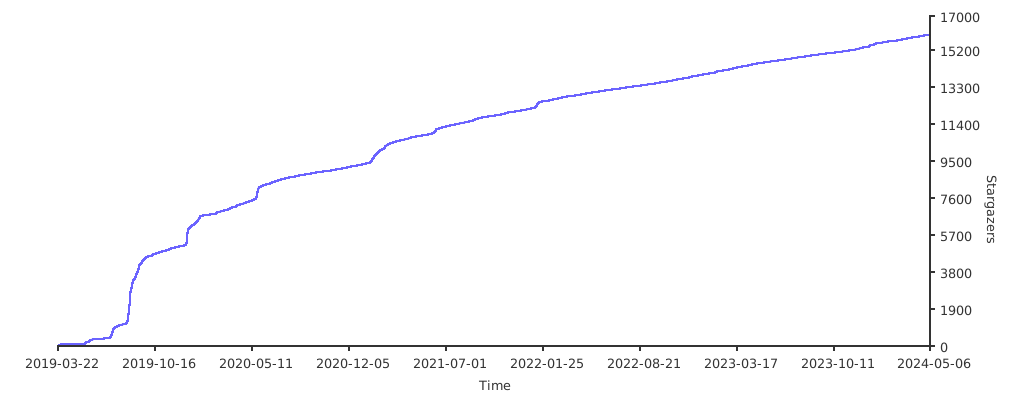](https://starchart.cc/justauth/JustAuth)
|
||||
|
||||
## 已集成的平台
|
||||
|
||||
| :computer: 平台 | :coffee: API类 | :page_facing_up: SDK |
|
||||
@@ -84,6 +88,8 @@ JustAuth,如你所见,它仅仅是一个**第三方授权登录**的**工具
|
||||
| <img src="https://gitee.com/yadong.zhang/static/raw/master/JustAuth/huawei.png" width="20"> | [AuthHuaweiRequest](https://gitee.com/yadong.zhang/JustAuth/blob/master/src/main/java/me/zhyd/oauth/request/AuthHuaweiRequest.java) | <a href="https://developer.huawei.com/consumer/cn/devservice/doc/30101" target="_blank">参考文档</a> |
|
||||
| <img src="https://gitee.com/yadong.zhang/static/raw/master/JustAuth/wechat.png" width="20"> | [AuthWeChatEnterpriseRequest](https://gitee.com/yadong.zhang/JustAuth/blob/master/src/main/java/me/zhyd/oauth/request/AuthWeChatEnterpriseRequest.java) | <a href="https://open.work.weixin.qq.com/api/doc#90000/90135/90664" target="_blank">参考文档</a> |
|
||||
| <img src="https://gitee.com/yadong.zhang/static/raw/master/JustAuth/csdn.png" width="20"> | [AuthCsdnRequest](https://gitee.com/yadong.zhang/JustAuth/blob/master/src/main/java/me/zhyd/oauth/request/AuthCsdnRequest.java) | 无 |
|
||||
| <img src="https://gitee.com/yadong.zhang/static/raw/master/JustAuth/kujiale.png" width="20"> | [AuthKujialeRequest](https://gitee.com/yadong.zhang/JustAuth/blob/master/src/main/java/me/zhyd/oauth/request/AuthKujialeRequest.java) | <a href="https://open.kujiale.com/open/apps/2/docs?doc_id=95" target="_blank">参考文档</a> |
|
||||
| <img src="https://gitee.com/yadong.zhang/static/raw/master/JustAuth/gitlab.png" width="20"> | [AuthGitlabRequest](https://gitee.com/yadong.zhang/JustAuth/blob/master/src/main/java/me/zhyd/oauth/request/AuthGitlabRequest.java) | <a href="https://docs.gitlab.com/ee/api/oauth2.html" target="_blank">参考文档</a> |
|
||||
|
||||
|
||||
## 快速开始
|
||||
@@ -93,7 +99,7 @@ JustAuth,如你所见,它仅仅是一个**第三方授权登录**的**工具
|
||||
<dependency>
|
||||
<groupId>me.zhyd.oauth</groupId>
|
||||
<artifactId>JustAuth</artifactId>
|
||||
<version>1.10.0</version>
|
||||
<version>${latest.version}</version>
|
||||
</dependency>
|
||||
```
|
||||
- 调用api
|
||||
@@ -105,24 +111,43 @@ AuthRequest authRequest = new AuthGiteeRequest(AuthConfig.builder()
|
||||
.redirectUri("redirectUri")
|
||||
.build());
|
||||
// 生成授权页面
|
||||
authRequest.authorize();
|
||||
authRequest.authorize("state");
|
||||
// 授权登录后会返回code(auth_code(仅限支付宝))、state,1.8.0版本后,可以用AuthCallback类作为回调接口的参数
|
||||
// 注:JustAuth默认保存state的时效为3分钟,3分钟内未使用则会自动清除过期的state
|
||||
authRequest.login(callback);
|
||||
```
|
||||
|
||||
## 贡献代码
|
||||
## 参与&贡献
|
||||
|
||||
JustAuth的发展离不开朋友们的支持,时至今日,JustAuth已渐趋完善,但仍有很大的改善空间。欢迎各位朋友为JustAuth贡献一份力量。
|
||||
|
||||
### 提供bug或建议
|
||||
|
||||
- [Gitee](https://gitee.com/yadong.zhang/JustAuth/issues)
|
||||
- [Github](https://github.com/justauth/JustAuth/issues)
|
||||
|
||||
如果你正在使用JustAuth,可以在这儿留下你的足迹,获得优先推送、曝光
|
||||
|
||||
- [Gitee](https://gitee.com/yadong.zhang/JustAuth/issues/IZ2T7)
|
||||
- [Github](https://github.com/justauth/JustAuth/issues/17)
|
||||
|
||||
### 贡献代码的步骤
|
||||
|
||||
1. fork本项目到自己的repo
|
||||
2. 把fork过去的项目也就是你仓库中的项目clone到你的本地
|
||||
3. 修改代码
|
||||
4. commit后push到自己的库
|
||||
2. 把fork过去的项目也就是你仓库中的项目clone到你本地
|
||||
3. 修改代码(`dev`分支)
|
||||
4. commit后push到自己的仓库
|
||||
5. 发起PR(pull request) 请求,提交到`dev`分支
|
||||
6. 等待作者合并
|
||||
6. 等待合并
|
||||
|
||||
_注:JustAuth只接受集成oauth2.0的平台_
|
||||
### 注意事项
|
||||
|
||||
## 关于功能尝鲜
|
||||
1. JustAuth只接受集成**OAuth2.0**的平台
|
||||
2. 建议安装“**阿里编码规约**”插件,然后进行开发
|
||||
3. 提交PR前请格式化好自己的代码
|
||||
4. 注释规范,自定义的方法一定要加上:方法说明、参数说明、返回值说明等
|
||||
|
||||
## 功能尝鲜
|
||||
|
||||
JustAuth一共有两个主要分支:
|
||||
- 线上版分支(master):稳定版,发布版就是这个分支的代码
|
||||
|
||||
+1
-1
@@ -1,6 +1,6 @@
|
||||
|
||||

|
||||
# JustAuth <small>1.10.0</small>
|
||||
# JustAuth <small>1.11.0</small>
|
||||
|
||||
<strong>史上最全的整合第三方登录的开源库</strong>
|
||||
|
||||
|
||||
+5
-4
@@ -1,7 +1,7 @@
|
||||
- [入门](README.md)
|
||||
- [更新记录](update.md)
|
||||
- 引导
|
||||
- [如何使用JustAuth集成一个平台](how-to-use.md)
|
||||
- [入门和使用](README.md)
|
||||
- 快速开始
|
||||
- [名词解释](explain.md)
|
||||
- [如何使用](how-to-use.md)
|
||||
- [获取授权链接](authorize.md)
|
||||
- [登录](login.md)
|
||||
- 其他特性
|
||||
@@ -10,3 +10,4 @@
|
||||
- [配套项目](supporting.md)
|
||||
- [Q&A](Q&A.md)
|
||||
- [Who is using](users.md)
|
||||
- [更新记录](update.md)
|
||||
|
||||
@@ -0,0 +1,29 @@
|
||||
本文将就JustAuth中涉及到的一些配置、关键词做一下简单说明,方便使用者理解、使用。
|
||||
|
||||
## 本文相关名词
|
||||
|
||||
- `调用者` 指使用`JustAuth`的开发者
|
||||
- `第三方` 指开发者对接的第三方网站,比如:QQ平台、微信平台、微博平台
|
||||
- `用户` 指最终服务的真实用户
|
||||
|
||||
## JustAuth中的关键词
|
||||
|
||||
以下内容了解后,将会使你更容易地上手JustAuth。
|
||||
|
||||
- `clientId` 客户端身份标识符(应用id),一般在申请完Oauth应用后,由**第三方平台颁发**,唯一
|
||||
- `clientSecret` 客户端密钥,一般在申请完Oauth应用后,由**第三方平台颁发**
|
||||
- `redirectUri` **调用者项目中的有效api地址**。用户在确认第三方平台授权(登录)后,第三方平台会重定向到该地址,并携带code等参数
|
||||
- `state` 用来保持授权会话流程完整性,防止CSRF攻击的安全的随机的参数,由**调用者生成**
|
||||
- `alipayPublicKey` 支付宝公钥。当选择支付宝登录时,必传该值,由**调用者生成**
|
||||
- `unionId` 是否需要申请unionid,目前只针对**qq登录**。注:qq授权登录时,获取unionid需要单独发送邮件申请权限。如果个人开发者账号中申请了该权限,可以将该值置为true,在获取openId时就会同步获取unionId。参考链接:[UnionID介绍](http://wiki.connect.qq.com/unionid%E4%BB%8B%E7%BB%8D)
|
||||
- `stackOverflowKey` Stack Overflow 登陆时需单独提供的key,由**第三方平台颁发**
|
||||
- `agentId` 企业微信登陆时需单独提供该值,由**第三方平台颁发**,为授权方的网页应用ID
|
||||
- `source` JustAuth支持的第三方平台,比如:GITHUB、GITEE等
|
||||
|
||||
## 参考资料
|
||||
|
||||
关于OAuth2相关的内容、原理可以自行参阅以下资料:
|
||||
|
||||
- [The OAuth 2.0 Authorization Framework](https://tools.ietf.org/html/rfc6749)
|
||||
- [OAuth 2.0](https://oauth.net/2/)
|
||||
|
||||
+32
-2
@@ -1,3 +1,33 @@
|
||||
# 如何使用JustAuth集成一个平台
|
||||
在前面有介绍到,JustAuth的特点之一就是**简**,极简主义,不给使用者造成不必要的障碍。
|
||||
|
||||
待补充
|
||||
既然牛皮吹下了, 那么如何才能用JustAuth实现第三方登录呢?
|
||||
|
||||
使用JustAuth总共分三步(**这三步也适合于JustAuth支持的任何一个平台**):
|
||||
|
||||
1. 申请注册第三方平台的开发者账号
|
||||
2. 创建第三方平台的应用,获取配置信息(`accessKey`, `secretKey`, `redirectUri`)
|
||||
3. 使用该工具实现授权登陆
|
||||
|
||||
|
||||
- 引入依赖
|
||||
```xml
|
||||
<dependency>
|
||||
<groupId>me.zhyd.oauth</groupId>
|
||||
<artifactId>JustAuth</artifactId>
|
||||
<version>${latest.version}</version>
|
||||
</dependency>
|
||||
```
|
||||
- 调用api
|
||||
```java
|
||||
// 创建授权request
|
||||
AuthRequest authRequest = new AuthGiteeRequest(AuthConfig.builder()
|
||||
.clientId("clientId")
|
||||
.clientSecret("clientSecret")
|
||||
.redirectUri("redirectUri")
|
||||
.build());
|
||||
// 生成授权页面
|
||||
authRequest.authorize("state");
|
||||
// 授权登录后会返回code(auth_code(仅限支付宝))、state,1.8.0版本后,可以用AuthCallback类作为回调接口的参数
|
||||
// 注:JustAuth默认保存state的时效为3分钟,3分钟内未使用则会自动清除过期的state
|
||||
authRequest.login(callback);
|
||||
```
|
||||
@@ -48,6 +48,29 @@
|
||||
auto2top: true,
|
||||
coverpage: true,
|
||||
formatUpdated: '{YYYY}/{MM}/{DD} {HH}:{mm}:{ss}',
|
||||
plugins: [
|
||||
function (hook, vm) {
|
||||
var footer = [
|
||||
'<hr/>',
|
||||
'<footer>',
|
||||
'<span>JustAuth: <a href="https://github.com/justauth/JustAuth">Github</a> | <a href="https://gitee.com/yadong.zhang/JustAuth">Gitee</a> ©2019.</span>',
|
||||
'<span>Proudly published with <a href="https://github.com/docsifyjs/docsify" target="_blank">docsify</a>.</span>',
|
||||
'</footer>'
|
||||
].join('');
|
||||
hook.afterEach(function (html) {
|
||||
return html + footer
|
||||
});
|
||||
hook.beforeEach(function (html) {
|
||||
var url = 'https://gitee.com/yadong.zhang/JustAuth/tree/master/docs/' + vm.route.file;
|
||||
var editHtml = '[📝 编辑该文档](' + url + ')\n';
|
||||
|
||||
return html
|
||||
+ '\n----\n'
|
||||
+ 'Last modified {docsify-updated} '
|
||||
+ editHtml
|
||||
})
|
||||
}
|
||||
]
|
||||
}
|
||||
</script>
|
||||
<script src="//unpkg.com/docsify/lib/docsify.min.js"></script>
|
||||
|
||||
@@ -1,3 +1,21 @@
|
||||
## v1.11.0
|
||||
### 2019/09/03
|
||||
|
||||
- 集成“Gitlab”授权登录
|
||||
|
||||
### 2019/09/02
|
||||
|
||||
- 集成“酷家乐”授权登录
|
||||
|
||||
## v1.10.1
|
||||
### 2019/08/17
|
||||
|
||||
- AuthUser添加构造函数,支持反序列化
|
||||
|
||||
### 2019/08/08
|
||||
|
||||
- 项目迁移到组织[justauth](https://github.com/justauth)
|
||||
|
||||
## v1.10.0
|
||||
### 2019/08/06
|
||||
|
||||
|
||||
@@ -6,12 +6,13 @@
|
||||
|
||||
<groupId>me.zhyd.oauth</groupId>
|
||||
<artifactId>JustAuth</artifactId>
|
||||
<version>1.10.0</version>
|
||||
<version>1.11.0</version>
|
||||
|
||||
<name>JustAuth</name>
|
||||
<url>https://gitee.com/yadong.zhang/JustAuth</url>
|
||||
<description>
|
||||
史上最全的整合第三方登录的工具,目前已支持Github、Gitee、微博、钉钉、百度、Coding、腾讯云开发者平台、OSChina、支付宝、QQ、微信、淘宝、Google、Facebook、抖音、领英、小米、微软和今日头条等第三方平台的授权登录。
|
||||
史上最全的整合第三方登录的开源库。目前已支持Github、Gitee、微博、钉钉、百度、Coding、腾讯云开发者平台、OSChina、支付宝、
|
||||
QQ、微信、淘宝、Google、Facebook、抖音、领英、小米、微软、今日头条、Teambition、StackOverflow、Pinterest、人人、华为、企业微信、酷家乐和Gitlab等第三方平台的授权登录。
|
||||
Login, so easy!
|
||||
</description>
|
||||
|
||||
|
||||
@@ -0,0 +1,5 @@
|
||||
/**
|
||||
* JustAuth 缓存实现, 提供基础的基于ConcurrentHashMap + ScheduledExecutorService 实现的定时缓存。
|
||||
* 同时对外暴露{@code AuthStateCache}接口,可进行对缓存实现的自定义。
|
||||
*/
|
||||
package me.zhyd.oauth.cache;
|
||||
@@ -16,12 +16,12 @@ import lombok.*;
|
||||
public class AuthConfig {
|
||||
|
||||
/**
|
||||
* 客户端id:对应个平台的appKey
|
||||
* 客户端id:对应各平台的appKey
|
||||
*/
|
||||
private String clientId;
|
||||
|
||||
/**
|
||||
* 客户端Secret:对应个平台的appSecret
|
||||
* 客户端Secret:对应各平台的appSecret
|
||||
*/
|
||||
private String clientSecret;
|
||||
|
||||
|
||||
@@ -567,6 +567,55 @@ public enum AuthSource {
|
||||
public String userInfo() {
|
||||
return "https://qyapi.weixin.qq.com/cgi-bin/user/getuserinfo";
|
||||
}
|
||||
},
|
||||
|
||||
/**
|
||||
* 酷家乐
|
||||
*
|
||||
* @since 1.11.0
|
||||
*/
|
||||
KUJIALE {
|
||||
@Override
|
||||
public String authorize() {
|
||||
return "https://oauth.kujiale.com/oauth2/show";
|
||||
}
|
||||
|
||||
@Override
|
||||
public String accessToken() {
|
||||
return "https://oauth.kujiale.com/oauth2/auth/token";
|
||||
}
|
||||
|
||||
@Override
|
||||
public String userInfo() {
|
||||
return "https://oauth.kujiale.com/oauth2/openapi/user";
|
||||
}
|
||||
|
||||
@Override
|
||||
public String refresh() {
|
||||
return "https://oauth.kujiale.com/oauth2/auth/token/refresh";
|
||||
}
|
||||
},
|
||||
|
||||
/**
|
||||
* Gitlab
|
||||
*
|
||||
* @since 1.11.0
|
||||
*/
|
||||
GITLAB {
|
||||
@Override
|
||||
public String authorize() {
|
||||
return "https://gitlab.com/oauth/authorize";
|
||||
}
|
||||
|
||||
@Override
|
||||
public String accessToken() {
|
||||
return "https://gitlab.com/oauth/token";
|
||||
}
|
||||
|
||||
@Override
|
||||
public String userInfo() {
|
||||
return "https://gitlab.com/api/v4/user";
|
||||
}
|
||||
};
|
||||
|
||||
/**
|
||||
|
||||
@@ -0,0 +1,4 @@
|
||||
/**
|
||||
* JustAuth 核心配置相关,包括{@code AuthConfig}和{@code AuthSource}
|
||||
*/
|
||||
package me.zhyd.oauth.config;
|
||||
@@ -0,0 +1,4 @@
|
||||
/**
|
||||
* 提供一些必要的枚举类
|
||||
*/
|
||||
package me.zhyd.oauth.enums;
|
||||
@@ -0,0 +1,4 @@
|
||||
/**
|
||||
* JustAuth专用异常封装
|
||||
*/
|
||||
package me.zhyd.oauth.exception;
|
||||
@@ -0,0 +1,4 @@
|
||||
/**
|
||||
* 针对JustAuth简单封装的日志打印工具,可用过{@link me.zhyd.oauth.log.Log.Config}开关日志和指定日志级别
|
||||
*/
|
||||
package me.zhyd.oauth.log;
|
||||
@@ -1,8 +1,6 @@
|
||||
package me.zhyd.oauth.model;
|
||||
|
||||
import lombok.Builder;
|
||||
import lombok.Getter;
|
||||
import lombok.Setter;
|
||||
import lombok.*;
|
||||
import me.zhyd.oauth.config.AuthSource;
|
||||
import me.zhyd.oauth.enums.AuthUserGender;
|
||||
|
||||
@@ -15,6 +13,8 @@ import me.zhyd.oauth.enums.AuthUserGender;
|
||||
@Getter
|
||||
@Setter
|
||||
@Builder
|
||||
@NoArgsConstructor
|
||||
@AllArgsConstructor
|
||||
public class AuthUser {
|
||||
/**
|
||||
* 用户第三方系统的唯一id。在调用方集成改组件时,可以用uuid + source唯一确定一个用户
|
||||
@@ -66,4 +66,5 @@ public class AuthUser {
|
||||
* 用户授权的token信息
|
||||
*/
|
||||
private AuthToken token;
|
||||
|
||||
}
|
||||
|
||||
@@ -0,0 +1,4 @@
|
||||
/**
|
||||
* JustAuth核心模型类,封装了用户、token、响应和callback等实体类
|
||||
*/
|
||||
package me.zhyd.oauth.model;
|
||||
@@ -0,0 +1,8 @@
|
||||
/**
|
||||
* JustAuth,如你所见,它仅仅是一个第三方授权登录的工具类库,它可以让我们脱离繁琐的第三方登录SDK,让登录变得So easy!
|
||||
* <p>
|
||||
* 史上最全的整合第三方登录的开源库。目前已支持Github、Gitee、微博、钉钉、百度、Coding、腾讯云开发者平台、OSChina、
|
||||
* 支付宝、QQ、微信、淘宝、Google、Facebook、抖音、领英、小米、微软、今日头条、Teambition、StackOverflow、Pinterest、
|
||||
* 人人、华为和企业微信等第三方平台的授权登录。 Login, so easy!
|
||||
*/
|
||||
package me.zhyd.oauth;
|
||||
@@ -34,9 +34,9 @@ public class AuthGithubRequest extends AuthDefaultRequest {
|
||||
protected AuthToken getAccessToken(AuthCallback authCallback) {
|
||||
HttpResponse response = doPostAuthorizationCode(authCallback.getCode());
|
||||
Map<String, String> res = GlobalAuthUtil.parseStringToMap(response.body());
|
||||
if (res.containsKey("error")) {
|
||||
throw new AuthException(res.get("error") + ":" + res.get("error_description"));
|
||||
}
|
||||
|
||||
this.checkResponse(res.containsKey("error"), res.get("error_description"));
|
||||
|
||||
return AuthToken.builder()
|
||||
.accessToken(res.get("access_token"))
|
||||
.scope(res.get("scope"))
|
||||
@@ -48,9 +48,9 @@ public class AuthGithubRequest extends AuthDefaultRequest {
|
||||
protected AuthUser getUserInfo(AuthToken authToken) {
|
||||
HttpResponse response = doGetUserInfo(authToken);
|
||||
JSONObject object = JSONObject.parseObject(response.body());
|
||||
if (object.containsKey("error")) {
|
||||
throw new AuthException(object.getString("error_description"));
|
||||
}
|
||||
|
||||
this.checkResponse(object.containsKey("error"), object.getString("error_description"));
|
||||
|
||||
return AuthUser.builder()
|
||||
.uuid(object.getString("id"))
|
||||
.username(object.getString("login"))
|
||||
@@ -67,4 +67,10 @@ public class AuthGithubRequest extends AuthDefaultRequest {
|
||||
.build();
|
||||
}
|
||||
|
||||
private void checkResponse(boolean error, String error_description) {
|
||||
if (error) {
|
||||
throw new AuthException(error_description);
|
||||
}
|
||||
}
|
||||
|
||||
}
|
||||
|
||||
@@ -0,0 +1,95 @@
|
||||
package me.zhyd.oauth.request;
|
||||
|
||||
import cn.hutool.http.HttpResponse;
|
||||
import com.alibaba.fastjson.JSONObject;
|
||||
import me.zhyd.oauth.cache.AuthStateCache;
|
||||
import me.zhyd.oauth.config.AuthConfig;
|
||||
import me.zhyd.oauth.config.AuthSource;
|
||||
import me.zhyd.oauth.enums.AuthUserGender;
|
||||
import me.zhyd.oauth.exception.AuthException;
|
||||
import me.zhyd.oauth.model.AuthCallback;
|
||||
import me.zhyd.oauth.model.AuthToken;
|
||||
import me.zhyd.oauth.model.AuthUser;
|
||||
import me.zhyd.oauth.utils.UrlBuilder;
|
||||
|
||||
/**
|
||||
* Gitlab登录
|
||||
*
|
||||
* @author yadong.zhang (yadong.zhang0415(a)gmail.com)
|
||||
* @since 1.11.0
|
||||
*/
|
||||
public class AuthGitlabRequest extends AuthDefaultRequest {
|
||||
|
||||
public AuthGitlabRequest(AuthConfig config) {
|
||||
super(config, AuthSource.GITLAB);
|
||||
}
|
||||
|
||||
public AuthGitlabRequest(AuthConfig config, AuthStateCache authStateCache) {
|
||||
super(config, AuthSource.GITLAB, authStateCache);
|
||||
}
|
||||
|
||||
@Override
|
||||
protected AuthToken getAccessToken(AuthCallback authCallback) {
|
||||
HttpResponse response = doPostAuthorizationCode(authCallback.getCode());
|
||||
JSONObject object = JSONObject.parseObject(response.body());
|
||||
|
||||
this.checkResponse(object);
|
||||
|
||||
return AuthToken.builder()
|
||||
.accessToken(object.getString("access_token"))
|
||||
.refreshToken(object.getString("refresh_token"))
|
||||
.idToken(object.getString("id_token"))
|
||||
.tokenType(object.getString("token_type"))
|
||||
.scope(object.getString("scope"))
|
||||
.build();
|
||||
}
|
||||
|
||||
@Override
|
||||
protected AuthUser getUserInfo(AuthToken authToken) {
|
||||
HttpResponse response = doGetUserInfo(authToken);
|
||||
JSONObject object = JSONObject.parseObject(response.body());
|
||||
|
||||
this.checkResponse(object);
|
||||
|
||||
return AuthUser.builder()
|
||||
.uuid(object.getString("id"))
|
||||
.username(object.getString("username"))
|
||||
.nickname(object.getString("name"))
|
||||
.avatar(object.getString("avatar_url"))
|
||||
.blog(object.getString("web_url"))
|
||||
.company(object.getString("organization"))
|
||||
.location(object.getString("location"))
|
||||
.email(object.getString("email"))
|
||||
.remark(object.getString("bio"))
|
||||
.gender(AuthUserGender.UNKNOWN)
|
||||
.token(authToken)
|
||||
.source(source)
|
||||
.build();
|
||||
}
|
||||
|
||||
private void checkResponse(JSONObject object) {
|
||||
// oauth/token 验证异常
|
||||
if (object.containsKey("error")) {
|
||||
throw new AuthException(object.getString("error_description"));
|
||||
}
|
||||
// user 验证异常
|
||||
if (object.containsKey("message")) {
|
||||
throw new AuthException(object.getString("message"));
|
||||
}
|
||||
}
|
||||
|
||||
/**
|
||||
* 返回带{@code state}参数的授权url,授权回调时会带上这个{@code state}
|
||||
*
|
||||
* @param state state 验证授权流程的参数,可以防止csrf
|
||||
* @return 返回授权地址
|
||||
* @since 1.11.0
|
||||
*/
|
||||
@Override
|
||||
public String authorize(String state) {
|
||||
return UrlBuilder.fromBaseUrl(super.authorize(state))
|
||||
.queryParam("scope", "read_user+openid+profile+email")
|
||||
.build();
|
||||
}
|
||||
|
||||
}
|
||||
@@ -0,0 +1,134 @@
|
||||
package me.zhyd.oauth.request;
|
||||
|
||||
import cn.hutool.http.HttpRequest;
|
||||
import cn.hutool.http.HttpResponse;
|
||||
import com.alibaba.fastjson.JSONObject;
|
||||
import me.zhyd.oauth.cache.AuthStateCache;
|
||||
import me.zhyd.oauth.config.AuthConfig;
|
||||
import me.zhyd.oauth.config.AuthSource;
|
||||
import me.zhyd.oauth.enums.AuthResponseStatus;
|
||||
import me.zhyd.oauth.exception.AuthException;
|
||||
import me.zhyd.oauth.model.AuthCallback;
|
||||
import me.zhyd.oauth.model.AuthResponse;
|
||||
import me.zhyd.oauth.model.AuthToken;
|
||||
import me.zhyd.oauth.model.AuthUser;
|
||||
import me.zhyd.oauth.utils.StringUtils;
|
||||
import me.zhyd.oauth.utils.UrlBuilder;
|
||||
|
||||
/**
|
||||
* 酷家乐授权登录
|
||||
*
|
||||
* @author shahuang
|
||||
* @since 1.11.0
|
||||
*/
|
||||
public class AuthKujialeRequest extends AuthDefaultRequest {
|
||||
|
||||
public AuthKujialeRequest(AuthConfig config) {
|
||||
super(config, AuthSource.KUJIALE);
|
||||
}
|
||||
|
||||
public AuthKujialeRequest(AuthConfig config, AuthStateCache authStateCache) {
|
||||
super(config, AuthSource.KUJIALE, authStateCache);
|
||||
}
|
||||
|
||||
/**
|
||||
* 返回带{@code state}参数的授权url,授权回调时会带上这个{@code state}
|
||||
* 默认只向用户请求用户信息授权
|
||||
*
|
||||
* @param state state 验证授权流程的参数,可以防止csrf
|
||||
* @return 返回授权地址
|
||||
* @since 1.11.0
|
||||
*/
|
||||
@Override
|
||||
public String authorize(String state) {
|
||||
return authorize(state, "get_user_info");
|
||||
}
|
||||
|
||||
/**
|
||||
* 请求授权url
|
||||
*
|
||||
* @param state state 验证授权流程的参数,可以防止csrf
|
||||
* @param scopeStr 请求用户授权时向用户显示的可进行授权的列表。如果要填写多个接口名称,请用逗号隔开
|
||||
* 参考https://open.kujiale.com/open/apps/2/docs?doc_id=95#Step1%EF%BC%9A%E8%8E%B7%E5%8F%96Authorization%20Code参数表内的scope字段
|
||||
* @return authorize url
|
||||
*/
|
||||
public String authorize(String state, String scopeStr) {
|
||||
UrlBuilder urlBuilder = UrlBuilder.fromBaseUrl(source.authorize())
|
||||
.queryParam("response_type", "code")
|
||||
.queryParam("client_id", config.getClientId())
|
||||
.queryParam("redirect_uri", config.getRedirectUri())
|
||||
.queryParam("state", getRealState(state));
|
||||
if (StringUtils.isNotEmpty(scopeStr)) {
|
||||
urlBuilder.queryParam("scope", scopeStr);
|
||||
}
|
||||
return urlBuilder.build();
|
||||
}
|
||||
|
||||
@Override
|
||||
public AuthToken getAccessToken(AuthCallback authCallback) {
|
||||
HttpResponse response = doPostAuthorizationCode(authCallback.getCode());
|
||||
return getAuthToken(response);
|
||||
}
|
||||
|
||||
private AuthToken getAuthToken(HttpResponse response) {
|
||||
JSONObject accessTokenObject = checkResponse(response);
|
||||
JSONObject resultObject = accessTokenObject.getJSONObject("d");
|
||||
return AuthToken.builder()
|
||||
.accessToken(resultObject.getString("accessToken"))
|
||||
.refreshToken(resultObject.getString("refreshToken"))
|
||||
.expireIn(resultObject.getIntValue("expiresIn"))
|
||||
.build();
|
||||
}
|
||||
|
||||
private JSONObject checkResponse(HttpResponse response) {
|
||||
String accessTokenStr = response.body();
|
||||
JSONObject accessTokenObject = JSONObject.parseObject(accessTokenStr);
|
||||
if (!"0".equals(accessTokenObject.getString("c"))) {
|
||||
throw new AuthException(accessTokenObject.getString("m"));
|
||||
}
|
||||
return accessTokenObject;
|
||||
}
|
||||
|
||||
@Override
|
||||
public AuthUser getUserInfo(AuthToken authToken) {
|
||||
String openId = this.getOpenId(authToken);
|
||||
HttpResponse response = HttpRequest.get(UrlBuilder.fromBaseUrl(source.userInfo())
|
||||
.queryParam("access_token", authToken.getAccessToken())
|
||||
.queryParam("open_id", openId)
|
||||
.build()).execute();
|
||||
JSONObject object = JSONObject.parseObject(response.body());
|
||||
if (!"0".equals(object.getString("c"))) {
|
||||
throw new AuthException(object.getString("m"));
|
||||
}
|
||||
JSONObject resultObject = object.getJSONObject("d");
|
||||
|
||||
return AuthUser.builder()
|
||||
.username(resultObject.getString("userName"))
|
||||
.nickname(resultObject.getString("userName"))
|
||||
.avatar(resultObject.getString("avatar"))
|
||||
.uuid(resultObject.getString("openId"))
|
||||
.token(authToken)
|
||||
.source(source)
|
||||
.build();
|
||||
}
|
||||
|
||||
/**
|
||||
* 获取酷家乐的openId,此id在当前client范围内可以唯一识别授权用户
|
||||
*
|
||||
* @param authToken 通过{@link AuthKujialeRequest#getAccessToken(AuthCallback)}获取到的{@code authToken}
|
||||
* @return openId
|
||||
*/
|
||||
private String getOpenId(AuthToken authToken) {
|
||||
HttpResponse response = HttpRequest.get(UrlBuilder.fromBaseUrl("https://oauth.kujiale.com/oauth2/auth/user")
|
||||
.queryParam("access_token", authToken.getAccessToken())
|
||||
.build()).execute();
|
||||
JSONObject accessTokenObject = checkResponse(response);
|
||||
return accessTokenObject.getString("d");
|
||||
}
|
||||
|
||||
@Override
|
||||
public AuthResponse refresh(AuthToken authToken) {
|
||||
HttpResponse response = HttpRequest.post(refreshTokenUrl(authToken.getRefreshToken())).execute();
|
||||
return AuthResponse.builder().code(AuthResponseStatus.SUCCESS.getCode()).data(getAuthToken(response)).build();
|
||||
}
|
||||
}
|
||||
@@ -1,12 +1,20 @@
|
||||
package me.zhyd.oauth.request;
|
||||
|
||||
import me.zhyd.oauth.enums.AuthResponseStatus;
|
||||
import me.zhyd.oauth.exception.AuthException;
|
||||
import me.zhyd.oauth.model.AuthCallback;
|
||||
import me.zhyd.oauth.model.AuthResponse;
|
||||
import me.zhyd.oauth.enums.AuthResponseStatus;
|
||||
import me.zhyd.oauth.model.AuthToken;
|
||||
|
||||
/**
|
||||
* JustAuth {@code Request}公共接口,所有平台的{@code Request}都需要实现该接口
|
||||
* <p>
|
||||
* {@link AuthRequest#authorize()}
|
||||
* {@link AuthRequest#authorize(String)}
|
||||
* {@link AuthRequest#login(AuthCallback)}
|
||||
* {@link AuthRequest#revoke(AuthToken)}
|
||||
* {@link AuthRequest#refresh(AuthToken)}
|
||||
*
|
||||
* @author yadong.zhang (yadong.zhang0415(a)gmail.com)
|
||||
* @since 1.8
|
||||
*/
|
||||
|
||||
@@ -0,0 +1,4 @@
|
||||
/**
|
||||
* JustAuth核心组件,所有授权登录都是基于{@code request}实现
|
||||
*/
|
||||
package me.zhyd.oauth.request;
|
||||
@@ -0,0 +1,4 @@
|
||||
/**
|
||||
* 提供一些简单的工具和校验等
|
||||
*/
|
||||
package me.zhyd.oauth.utils;
|
||||
@@ -283,7 +283,22 @@ public class AuthRequestTest {
|
||||
AuthRequest authRequest = new AuthHuaweiRequest(AuthConfig.builder()
|
||||
.clientId("clientId")
|
||||
.clientSecret("clientSecret")
|
||||
.redirectUri("redirectUri")
|
||||
.redirectUri("http://redirectUri")
|
||||
.build());
|
||||
// 返回授权页面,可自行跳转
|
||||
authRequest.authorize("state");
|
||||
// 授权登录后会返回code(auth_code(仅限支付宝))、state,1.8.0版本后,可以用AuthCallback类作为回调接口的入参
|
||||
// 注:JustAuth默认保存state的时效为3分钟,3分钟内未使用则会自动清除过期的state
|
||||
AuthResponse login = authRequest.login(new AuthCallback());
|
||||
}
|
||||
|
||||
@Test
|
||||
public void weChatEnterpriseTest() {
|
||||
AuthRequest authRequest = new AuthWeChatEnterpriseRequest(AuthConfig.builder()
|
||||
.clientId("clientId")
|
||||
.clientSecret("clientSecret")
|
||||
.redirectUri("http://redirectUri")
|
||||
.agentId("agentId")
|
||||
.build());
|
||||
// 返回授权页面,可自行跳转
|
||||
authRequest.authorize("state");
|
||||
|
||||
@@ -0,0 +1,31 @@
|
||||
package me.zhyd.oauth.model;
|
||||
|
||||
import com.alibaba.fastjson.JSON;
|
||||
import org.junit.Assert;
|
||||
import org.junit.Test;
|
||||
|
||||
public class AuthUserTest {
|
||||
|
||||
@Test
|
||||
public void serialize() {
|
||||
|
||||
AuthUser user = AuthUser.builder()
|
||||
.nickname("test")
|
||||
.build();
|
||||
String json = JSON.toJSONString(user);
|
||||
Assert.assertEquals(json, "{\"nickname\":\"test\"}");
|
||||
|
||||
}
|
||||
|
||||
@Test
|
||||
public void deserialize() {
|
||||
AuthUser user = AuthUser.builder()
|
||||
.nickname("test")
|
||||
.build();
|
||||
String json = JSON.toJSONString(user);
|
||||
|
||||
AuthUser deserializeUser = JSON.parseObject(json, AuthUser.class);
|
||||
Assert.assertEquals(deserializeUser.getNickname(), "test");
|
||||
}
|
||||
|
||||
}
|
||||
Reference in New Issue
Block a user